
Set up GeekProxy in AdsPower
AdsPower attaches a proxy to each profile on the Proxy tab, keeps a shared Proxies section for lists, checks every entry and shows the outbound IP next to it. This guide covers the one-paste format, the Add Proxy syntax with remarks, the IP checker choice, and the fingerprint settings that follow the proxy IP.
You'll need: an active GeekProxy plan and the proxy credentials from your dashboard. First profile takes about two minutes.
Get proxies1 Before you start
AdsPower runs on Windows 10 and later (64 and 32 bit), macOS 11 Big Sur and later (Apple Silicon and Intel builds) and Ubuntu Desktop 22.04 and later. The free version gives 2 profiles for life, and new accounts can try everything for 7 days. Two profiles are enough for this guide.
The proxy type dropdown lists HTTP, Socks 5, HTTPS, SSH and No Proxy (Local network). SOCKS4 isn't there. Login and password work for every type inside AdsPower's own browsers, SunBrowser on Chromium and FlowerBrowser on Firefox, so a GeekProxy SOCKS5 port with credentials is fine.
What you'll need
- Active GeekProxy plan (ISP, datacenter, residential or mobile)
- Proxy credentials from your dashboard: Host, Port, Username, Password
- AdsPower installed and signed in, free plan is fine
- FieldWhere it comes from
- ProtocolHTTP / SOCKS5
- HostIP or gateway hostname from the dashboard
- Portfrom the dashboard
- Usernamefrom the dashboard
- Passwordfrom the dashboard
2 Where to get your credentials
- Log in to your GeekProxy dashboard
- Open the plan. For per-IP plans (ISP, datacenter) the IPs, ports, login and password are listed right there. Export gives you the whole list as text for the Add Proxy box
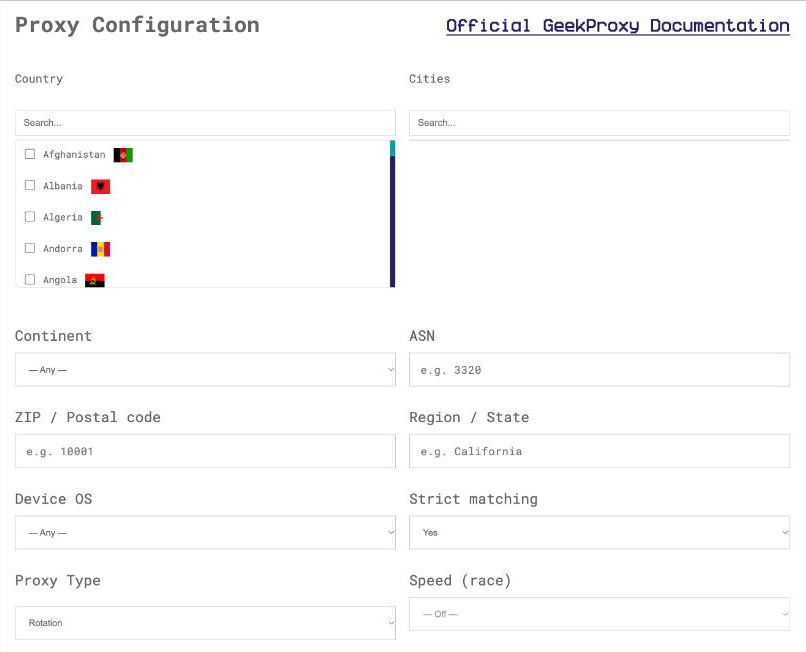
- For residential and mobile plans click Options. The Proxy Configuration panel builds the login string with your country, city and sticky session. Copy one line per profile from the Proxy List
3 Proxy tab of a profile
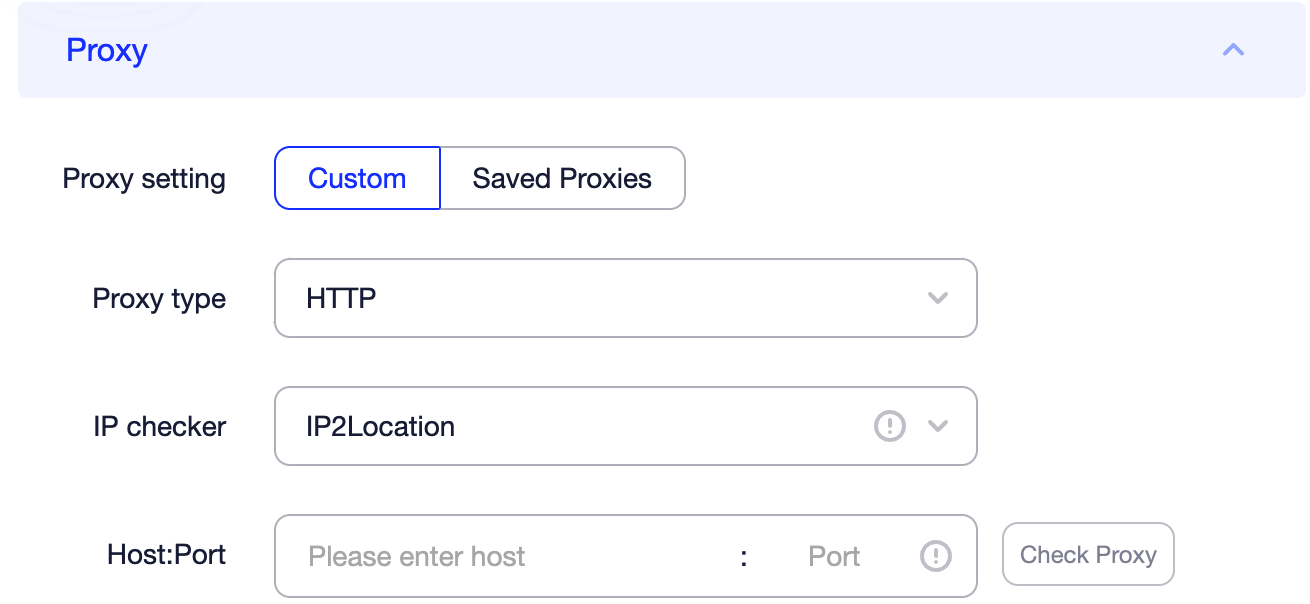
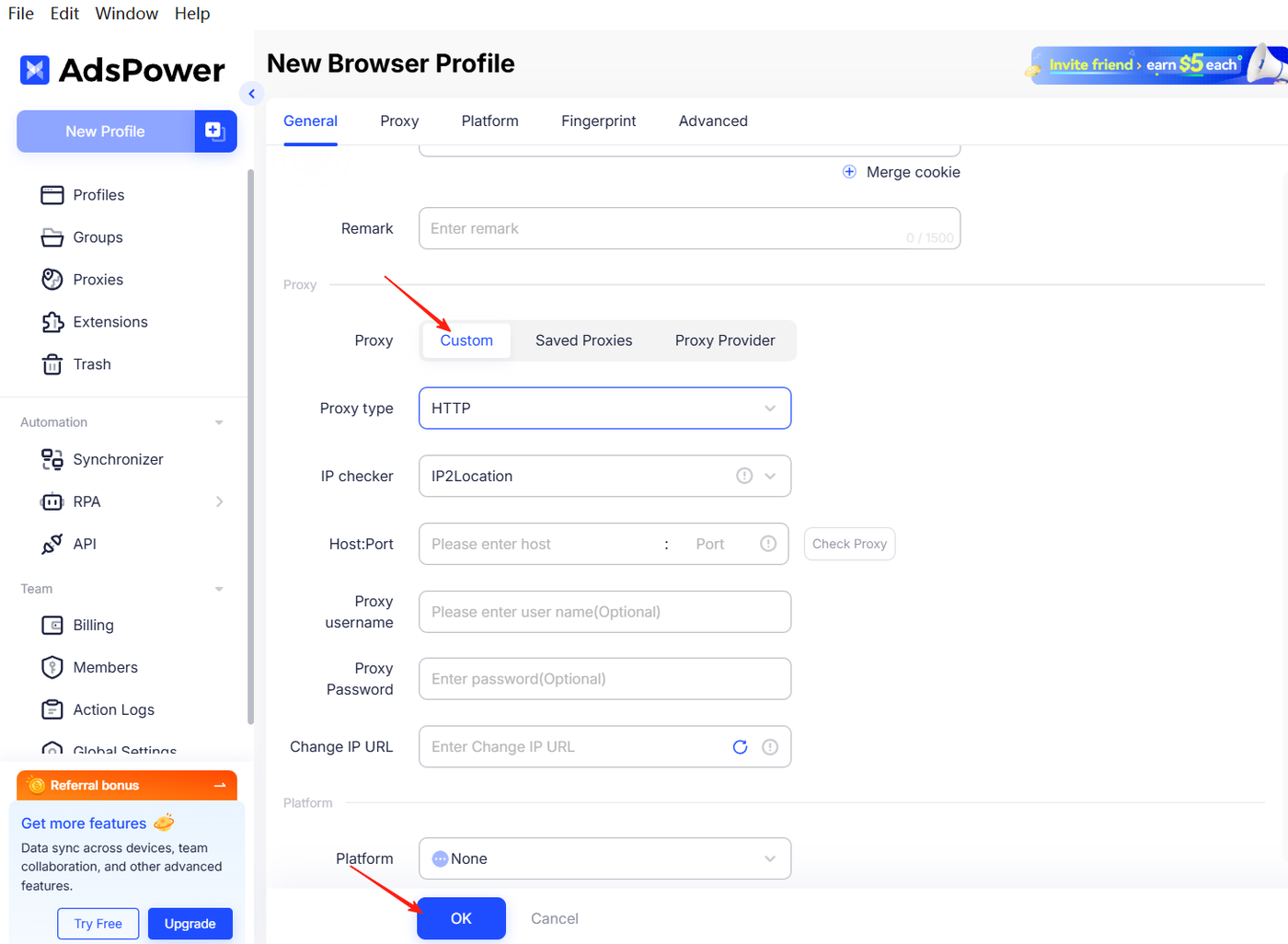
Create a profile and open its Proxy tab. Choose Custom, then:
- Pick the Proxy type: HTTP for the GeekProxy HTTP port, Socks 5 for the SOCKS5 port
- Paste the whole line into Host:Port in the form
IP:port:username:password. AdsPower documents that the other fields fill in automatically, so Proxy username and Proxy Password appear on their own - Leave Change IP URL empty. AdsPower says the field is exclusive for mobile proxies
- Press Check proxy and wait for Connection test passed
IP:PORT:LOGIN:PASSWORD
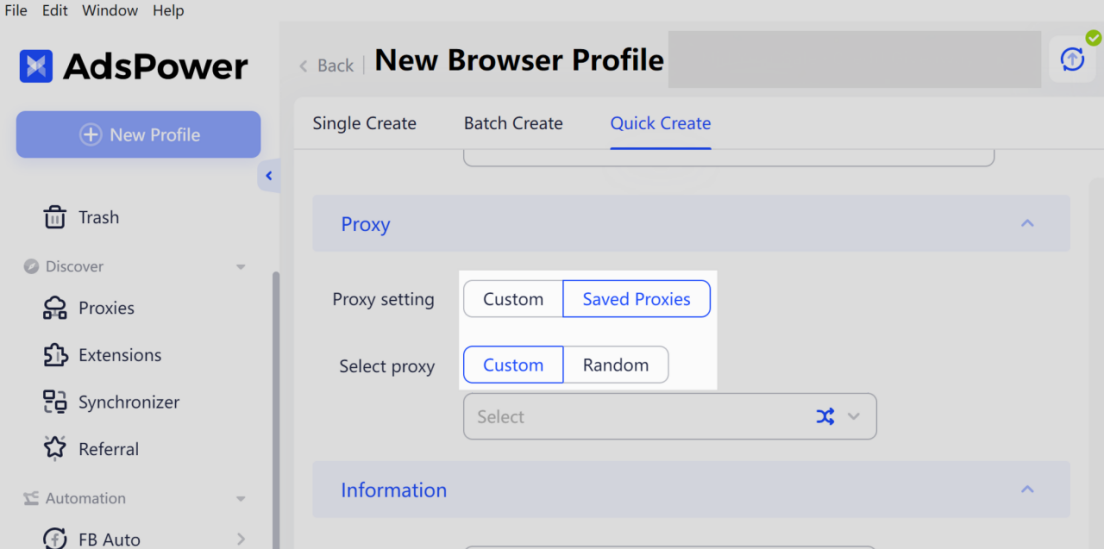
Instead of Custom you can pick Saved Proxies and choose from the Proxies section. The blue loop button next to it assigns a random saved proxy, with the method set in the Proxies section. Handy once you have a list; for the first profile, Custom is quicker.
4 The Proxies section and Add Proxy
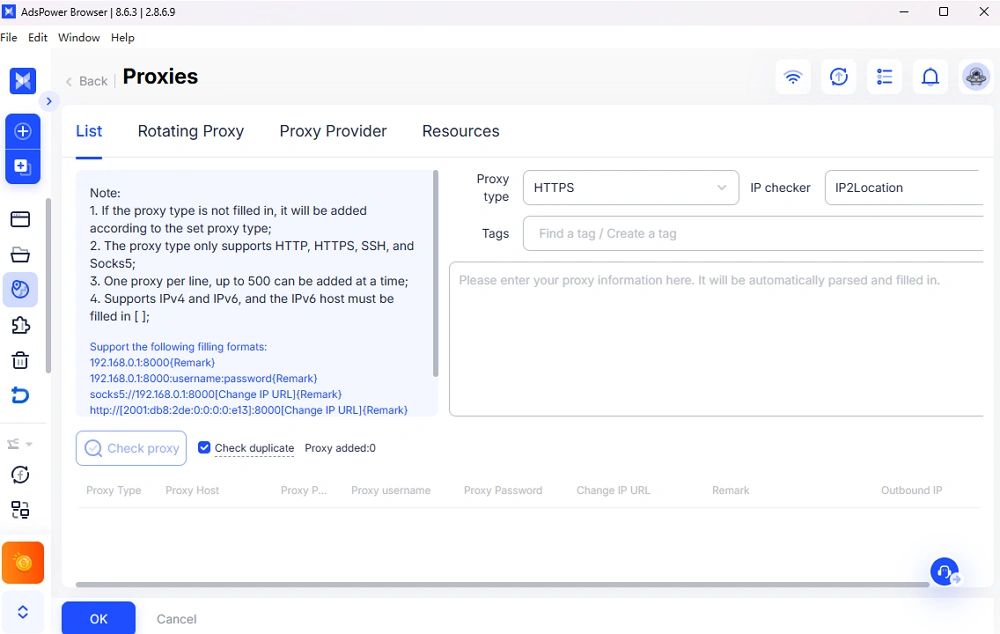
The Proxies section is the shared list. Click Add Proxy, paste one proxy per line, press OK. The syntax AdsPower shows in that box, with our values:
IP:PORT{ISP DE 1}
IP:PORT:LOGIN:PASSWORD{ISP DE 1}
socks5://IP:PORT:LOGIN:PASSWORD{Turbo session 7}
http://[2001:db8::e13]:PORT[Change IP URL]{IPv6 example}
Curly braces hold a remark, square brackets hold the change-IP URL, and an IPv6 host goes inside square brackets too. The first line, with no credentials, is the shape for a plan in IP whitelist mode. Give every row a remark; the Proxies table has a Remark column and you'll be glad it isn't empty.
The table also shows Proxy type, Outbound IP, IP checker, Proxy status, End date and Proxy provider. Each row can be changed, checked, edited or deleted, and Check proxy runs on a selection in bulk. The Outbound IP is green when the last check passed, red when it failed, gray while waiting, with the time of the last check.
One detail worth a sentence: the IP checker column. AdsPower can ask IP2Location or ip-api where an IP lives, with the default set in Global Settings; static proxies default to ip-api. If a proxy shows the wrong country, switching the checker is the first thing to try.
Bulk profile import uses a template with the fields proxytype, proxy, proxyurl, ipchecker and proxyid. A row looks like proxytype=http and proxy=IP:PORT:LOGIN:PASSWORD; proxyid takes a Proxy ID or the word random.
5 Fingerprint settings that follow the IP
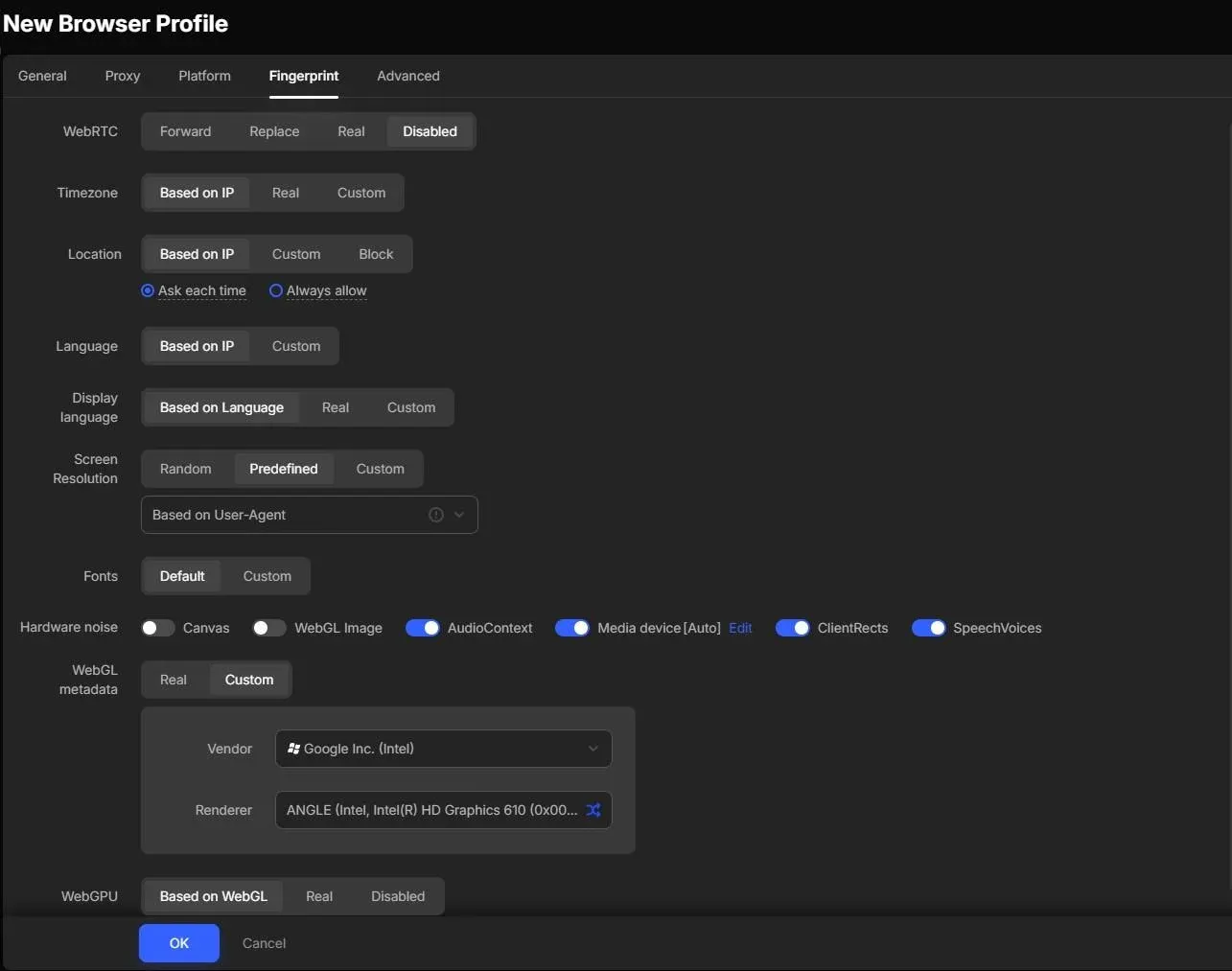
On the fingerprint tab, Timezone, Location and Language are set to Based on IP(Default). Leave them. They read the proxy's outbound IP and the profile ends up in the right time zone without you typing anything.
WebRTC has five options: Forward, Replace, Real, Disabled and Disabled UDP. Real exposes your own address, so never that. Replace substitutes the proxy IP and is the usual pick. Disabled UDP needs Patch 2.8.2.0 or newer to take effect, per the docs.
6 Verify it works
Open the profile and load https://ipinfo.io/json. The ip field must show the proxy address, not your own. On an ISP or datacenter plan it matches the Outbound IP in the Proxies table, on Residential or Turbo it is an address from the pool in the country you picked. Compare the country and timezone fields with the fingerprint tab. On a sticky residential session, reload several times and expect the same IP.
7 Which GeekProxy product fits
AdsPower profiles are built to carry accounts for a long time, so each one wants a fixed exit. ISP static is the direct answer: one IP from a residential network per profile, no traffic counter, 25 countries. When you need more locations than that, Residential Turbo in sticky mode gives every profile its own session string, held for up to 1440 minutes, pasted as host:port:user:pass{Remark}. HTTP or SOCKS5, your call, AdsPower handles both with credentials. Mobile is the one product where the Change IP URL field is relevant, and AdsPower notes that refreshing it changes the IP for every profile that shares that proxy.
8 Common issues
Connection test failed
Check the Proxy type against the port from the dashboard first. Then the credentials: a whitelist-mode plan wants empty username and password and your IP on the list, a login-mode plan wants both filled. Then the plan's end date.
The country is wrong in the Proxies table
Geolocation databases disagree. Switch the IP checker for that row between ip-api and IP2Location and re-check. If the browser's own IP page shows the right country, the proxy is fine and only the checker was off.
Outbound IP stays gray
Gray means waiting for a check. Run Check proxy on the row. If it never turns green or red, the app can't reach the checker at all, which points at your local network.
The type came in as Socks5 but my port is HTTP
Some provider presets in AdsPower default to Socks5. Edit the row and set the type to HTTP, or add the http:// prefix in the Add Proxy box.
Changing the IP on one profile changed it on others
Expected with a shared mobile proxy and a Change IP URL: AdsPower refreshes the IP for every profile using that proxy. Give each profile its own proxy or its own session.
Get proxies for AdsPower
Static ISP IPs or sticky residential sessions per profile, HTTP and SOCKS5 with login and password.
Place an order