Set up GeekProxy with BeMob
BeMob is a cloud tracker with no proxy setting. Its docs describe testing the old-fashioned way: copy the campaign link, paste it into your browser's address bar, confirm the visit in Live Visits. That browser is where a GeekProxy exit goes, so the visit arrives from the offer's country rather than yours. This guide covers that test and the flow conditions that react to a proxy IP: Proxy, Crawler, Connection Type, ISP. It also covers the bot filters and the paid invalid-traffic metrics that count datacenter IPs.
You'll need: an active GeekProxy plan, the proxy credentials from your dashboard, and a BeMob campaign. The Free plan covers the Live Visits part. About ten minutes.
Get proxies1 Before you start
No proxy field, anywhere. BeMob receives the click on its own servers and redirects it, and the only time the word "proxy" appears is as a rule condition. There are 34 of those conditions. The ones that look at the network are Connection Type, IP, ISP, Mobile Carrier, Uniqueness, Bot Filter Marks, WebView, Crawler and Proxy. The docs do not say how Proxy is detected, only that it exists, so treat it as a black box that reads the IP.
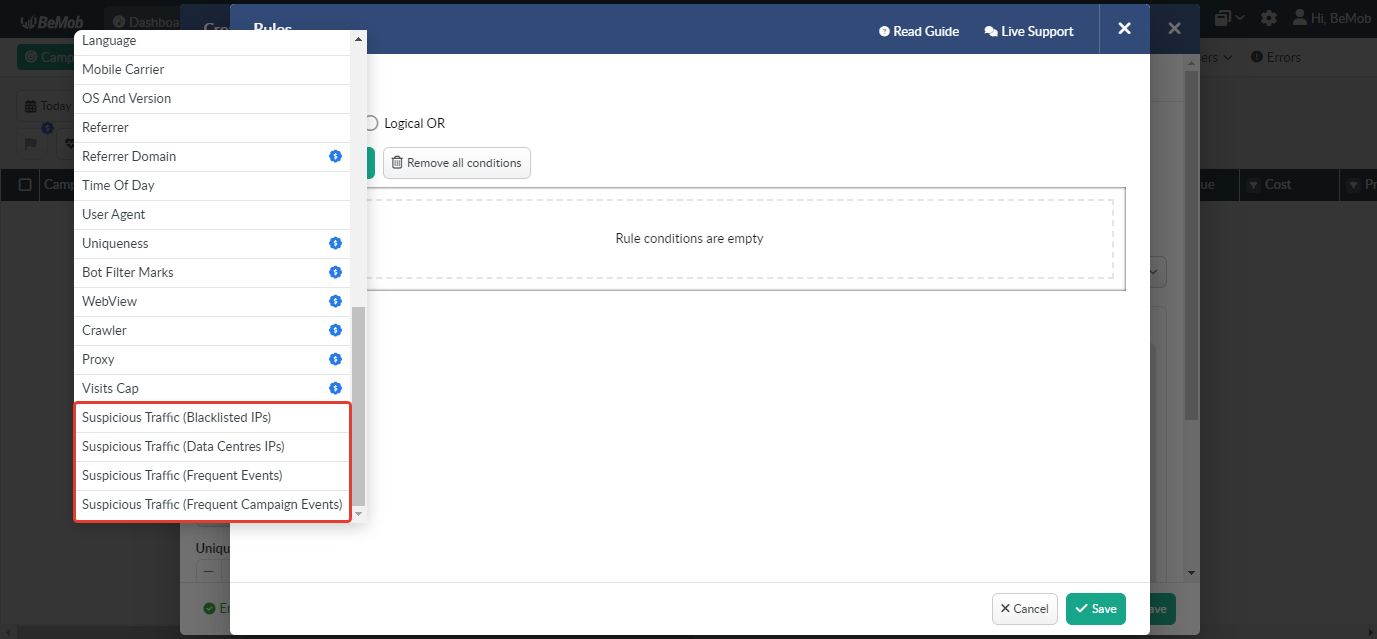
Then there are the invalid-traffic metrics, sold as add-ons: Traffic From Data Centers, Traffic From Blacklisted IPs, Frequent Events, Frequent Campaign Events, Fast Clicks. The docs say the checking is based on the IP address data associated with a visit. A datacenter exit therefore lands in "Suspicious Visits (data centers IPs)". A residential or ISP exit does not, because it is not a datacenter address. That one sentence decides which GeekProxy product you test with.
What you'll need
- Active GeekProxy plan (residential or ISP; section 7 explains why not datacenter)
- Proxy credentials from your dashboard: Host, Port, Username, Password
- Chrome or Firefox with a dedicated profile, or an anti-detect profile
- A BeMob campaign with a flow, a lander and an offer. Live Visits works on Free; the Proxy condition and bot rules are listed as plan features, so check yours
- Field Where it comes from
- Protocol HTTP (SOCKS5 only with IP whitelist)
- Host IP or gateway hostname from the dashboard
- Port from the dashboard
- Username from the dashboard
- Password from the dashboard
2 Where to get your credentials
- Log in to your GeekProxy dashboard
- Open the plan. For per-IP plans (ISP, datacenter) the IP list, ports, login and password sit right on the card, and Export hands you the whole list as text
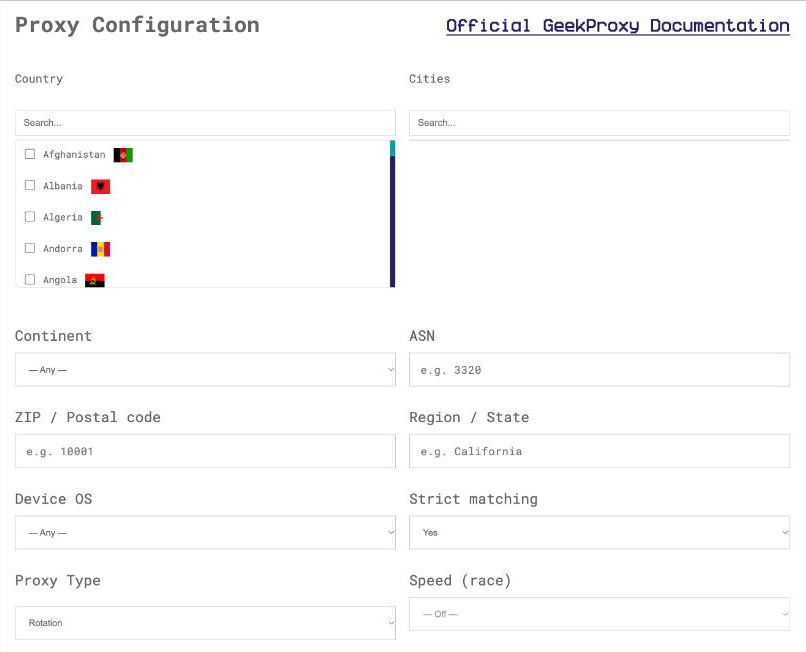
- For residential plans click Options. The Proxy Configuration panel builds the login string with your country, city and session settings. Copy the finished line from the Proxy List
Choose the offer's country. If a flow rule uses State/Region or City, choose the city as well, otherwise the test takes the default path and you learn nothing about the rule.
3 Put a browser behind the proxy
Same drill as for any tracker, and the long version lives in our Google Chrome and Firefox guides.
- Create a separate browser profile for tests. BeMob has a Uniqueness condition, and cookies from yesterday's visit will make you a returning visitor today
- Set
IPportPORTas an HTTP proxy and answer the login prompt withLOGINandPASSWORD - Open
https://ipinfo.io/json. The IP on the page must be the proxy
Chrome, Edge, Opera and Firefox never send SOCKS5 credentials. Use HTTP with login and password, or SOCKS5 with the GeekProxy plan switched to IP whitelist. Anti-detect browsers take either.
4 Open the campaign URL and watch Live Visits
BeMob's conversion-test guide is explicit: copy the campaign link from BeMob and paste it into your browser's address bar, which generates a real click ID. Do exactly that in the proxied browser. Follow the redirect to the lander, click through to the offer, and check the language, the currency and the price for that geo.
Then open Live Visits in BeMob. Your visit should be there within seconds, with the country and ISP of the exit you picked. The docs also warn that traffic-source macros stay empty during a manual browser test, because no ad network filled them in. That is expected, not a bug.

5 Flow rules, bot filters and invalid-traffic metrics
Rules are where your exit type starts to matter. Go to Flows, click New, then Add new rule and Add condition. Each condition takes Equal or Not equal, conditions combine with Logical AND or Logical OR, and rule priority is set by moving rules up and down. A rule with Proxy = Equal that routes to a safe page will catch whatever BeMob's detection calls a proxy. A rule on Connection Type or ISP will route on the network your exit belongs to.
Bot filters
Under Settings, the Bot filters tab offers three actions: Mark As Bot, Redirect bot, Close connection. Detection rules are built from conditions like Connection type, Country, IP, ISP, Mobile carrier, User agent, Referrer, Device type and so on. A marked visit can then be routed in a flow through the condition Bot Filters Marks = Marked as bot, and shows up in the Bot visits report column. One catch. If you wrote a bot rule on your office IP to keep test clicks out of stats, the proxied browser comes from a different IP and will not be marked.
Invalid-traffic metrics
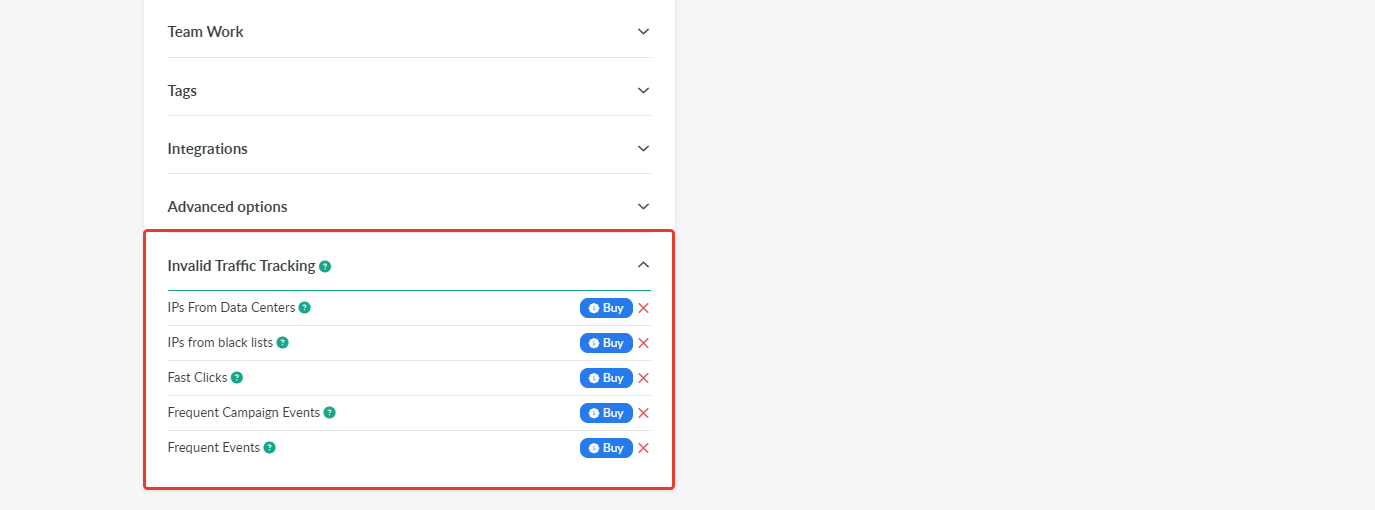
These are bought separately under Subscription, Invalid Traffic Tracking, with a Buy button per metric. Once active, they add columns such as "Suspicious Visits (data centers IPs)" and can drive distribution rules. Frequent Campaign Events fires above 60 events per minute, Fast Clicks on clicks under 800 milliseconds. Your manual test will never trip those two. The data-center metric is the one a wrong exit trips.
Landing Page Protection (Settings, Security) signs the lander URL with a secret key and a TTL. It is meant to keep spy tools off your page, and it does not work with no-redirect tracking. If the lander refuses your test visit, check that before blaming the proxy.
6 Verify it works
- In the proxied browser open
https://ipinfo.io/jsonand confirm the proxy IP - Paste the campaign URL, walk lander to offer
- In Live Visits, find the visit. Country, ISP and Connection Type should match the exit
- The visit should have taken the expected flow path, with no bot mark and, if you bought the metric, no data-center flag
Then the next geo. Each country gets its own exit and its own pass. Keep an eye on the Free plan's 100,000 events per month while you do it; test clicks count.
7 Which GeekProxy product fits
Residential Flex or ISP static for the browser checks. Both come from consumer networks, so they stay out of the data-center metric and give BeMob's Proxy condition nothing obvious to match. Flex is TCP only, fine for browsing, with the country chosen per session; ISP static holds one address for weeks. Mobile is required when a flow routes on Connection Type = mobile or on Mobile Carrier, since a laptop on Wi-Fi behind a residential proxy never reaches that branch. Datacenter IPv4 lands in "Suspicious Visits (data centers IPs)" by definition, so leave it out of visitor-side tests.
8 Common issues
My visit is counted as suspicious or routed by the Proxy rule
You came from a datacenter exit. Switch to residential or ISP and open the campaign URL again. The classification is by IP, nothing in BeMob to tweak.
Live Visits shows the visit, but source macros are empty
Normal for a manual browser test. The docs say so. Macros are filled by the ad network, and there is no ad network in a pasted link.
The lander refuses the visit
Landing Page Protection signature expired or the campaign is on no-redirect tracking, which the protection does not support. Fix that first, the proxy is not involved.
The browser never asks for the proxy password
You configured SOCKS5. Chrome and Firefox do not send SOCKS5 credentials. Use HTTP with login and password, or an IP-whitelisted plan.
Account blocked on the Free plan
The Free plan has 100,000 events per month and no overage; above the limit the account is blocked. Test rounds across many geos add up faster than you think.
Get proxies for BeMob checks
Residential, ISP and mobile exits per geo, HTTP and SOCKS5, ready in seconds.
Place an order