
Set up GeekProxy with CleanTalk and ZeroBounce
Both are validation APIs that do the hard work on their own servers, and neither has a proxy setting. ZeroBounce does let you whitelist IPs per API key, which is where a fixed GeekProxy address comes in. CleanTalk mostly cares about the visitor IP you pass as a parameter. This guide shows how to call both APIs from a static IP with curl and Python. It also covers what the official SDKs can and cannot do, and how to keep client dashboards apart in separate browser profiles.
You'll need: an active GeekProxy plan with a static IP and the proxy credentials from your dashboard. Setup takes about 10 minutes.
Get proxies1 Before you start
No proxy field in either product. We read the ZeroBounce API and key-management docs, the CleanTalk method pages and both official Python libraries. ZeroBounce connects to mail servers from its own infrastructure, so you never need port 25. CleanTalk scores the visitor you describe in the request, not the machine that sent it. The proxy is useful on your side only, and for two reasons:
- ZeroBounce keys can carry a Whitelist IP. Once set, every call must arrive from that address, so your script needs an exit that never changes
- You want all API traffic from several servers or a laptop to leave through one known address, for a firewall rule, a region, or just predictability
A rotating residential proxy is the wrong tool for both. One static IP, reused forever, is the right one.
What you'll need
- Active GeekProxy plan with a static IP (datacenter or ISP)
- Proxy credentials from your dashboard: Host, Port, Username, Password
- A ZeroBounce API key, a CleanTalk access key, or both. ZeroBounce gives 100 free verifications a month to sign-ups on a business domain, CleanTalk Anti-Spam has a 7-day trial
- curl, or Python 3.8 or newer with
requests
- Field Where it comes from
- Protocol HTTP / SOCKS5
- Host IP or gateway hostname from the dashboard
- Port from the dashboard
- Username from the dashboard
- Password from the dashboard
2 Where to get your credentials
- Log in to your GeekProxy dashboard
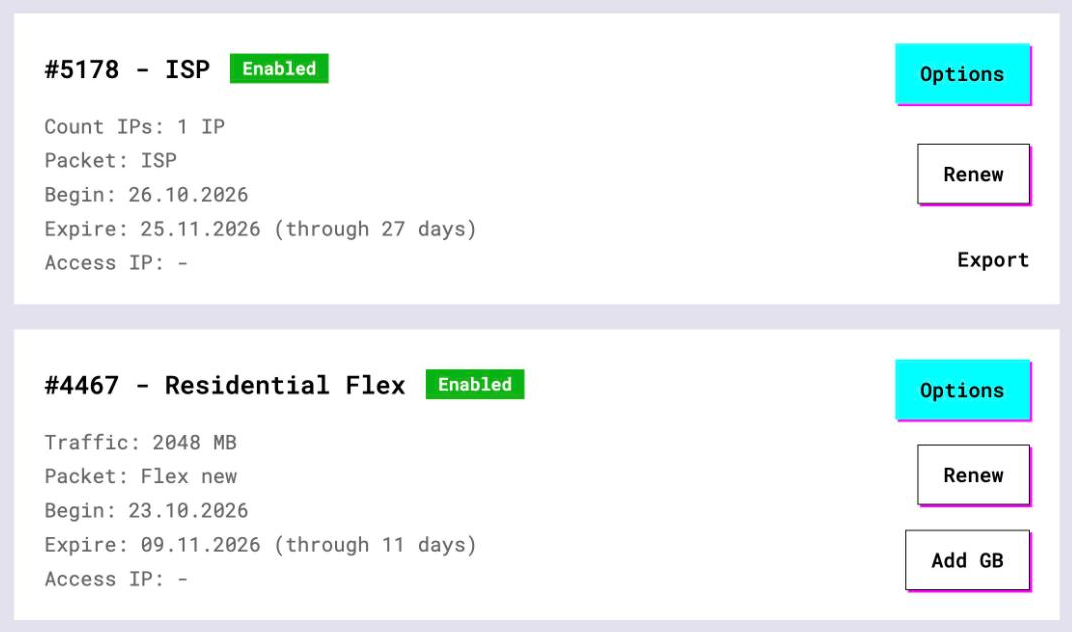
- Open the plan. For per-IP plans (datacenter, ISP) the IP list, port, login and password are on the card, and Export gives you the whole list as text
- Keep the exit IP handy. On a static plan the host you connect to is the address ZeroBounce will see, and the one you put in the whitelist
3 ZeroBounce: whitelist the IP, call the API
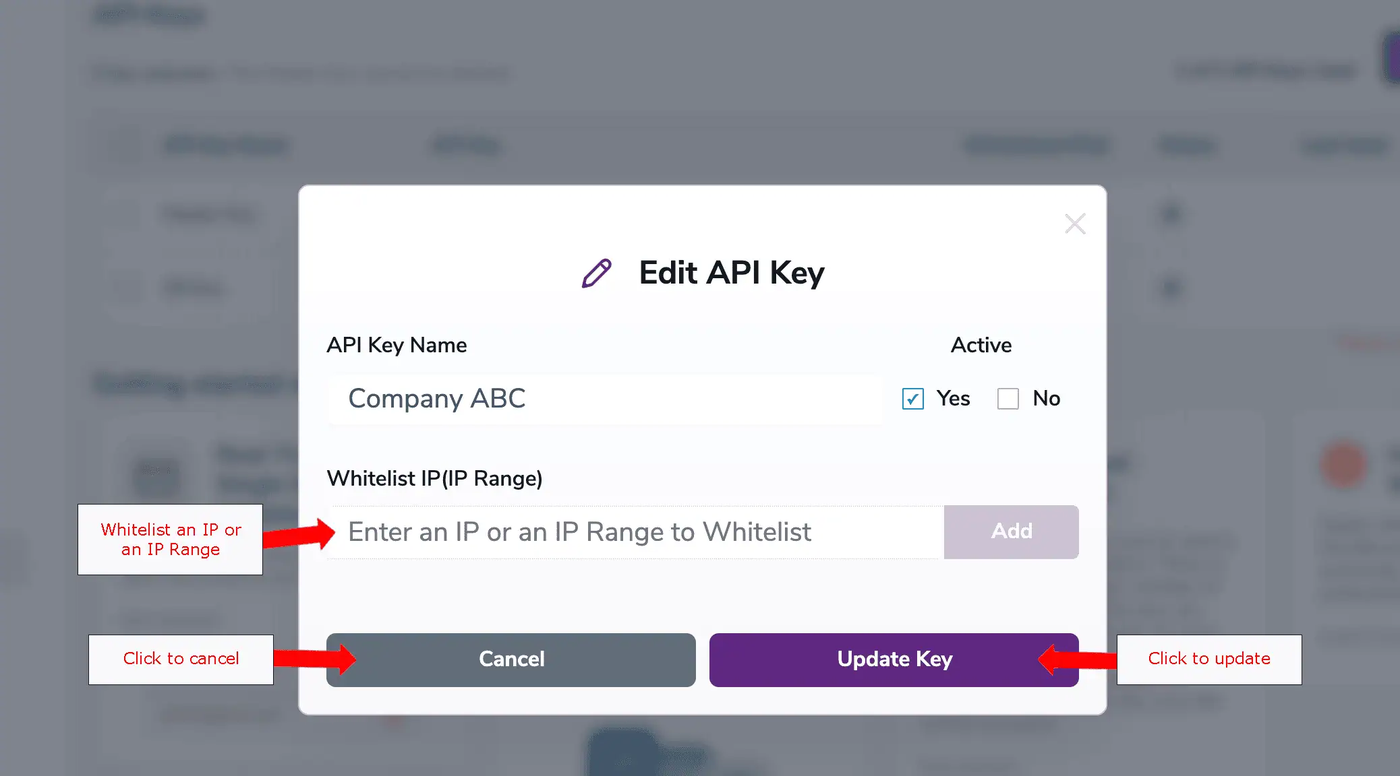
Keys live under API Keys Management in the dashboard. Click Create a new API Key at the top right, name it, set it active. The docs say the Whitelist IP is configured "through Edit Mode after you have created your key". So open the key in Edit Mode and add the GeekProxy static IP. Single IPs and ranges both work, and you can add several. Save. On the Master Key only the Whitelist IP can be edited, and extra keys can be deleted when no longer used.
Now the call. The endpoint is https://api.zerobounce.net/v2/validate, with regional twins at api-us.zerobounce.net and api-eu.zerobounce.net. Required: api_key and email. Optional: ip_address, timeout from 3 to 60 seconds (default 30), activity_data, verify_plus.
curl -x http://LOGIN:PASSWORD@IP:PORT \
     "https://api.zerobounce.net/v2/validate?api_key=$ZB_KEY&[email protected]"
A detail that trips people: ip_address is the sign-up IP of the subscriber, data about the lead. It is not your client IP, and a proxy does not change it. Leave it blank if you don't have it, the docs allow that.
Python requests
import os, requests

PROXY = "http://LOGIN:PASSWORD@IP:PORT"
proxies = {"http": PROXY, "https": PROXY}

r = requests.get("https://api.zerobounce.net/v2/validate",
                 params={"api_key": os.environ["ZB_KEY"], "email": "[email protected]"},
                 proxies=proxies, timeout=(5, 60))
print(r.json())
Sixty seconds on the read side is deliberate. ZeroBounce says a response takes 1 to 30 seconds, with most domains answering in 1 to 5.
The official Python SDK
pip install zerobouncesdk, then ZeroBounce("<YOUR_API_KEY>") and validate(email, ip_address). We read the source: it calls module-level requests.get and requests.post with no proxies argument and no Session you could reach. So environment variables are the only lever, and they work because requests honours them when nothing else is passed.
export HTTPS_PROXY="http://LOGIN:PASSWORD@IP:PORT"
python3 -c "from zerobouncesdk import ZeroBounce; zb = ZeroBounce('$ZB_KEY'); print(zb.validate('[email protected]', ''))"
For SOCKS5 use ALL_PROXY="socks5h://..." and install requests[socks] first.
4 CleanTalk: Anti-Spam and Database API
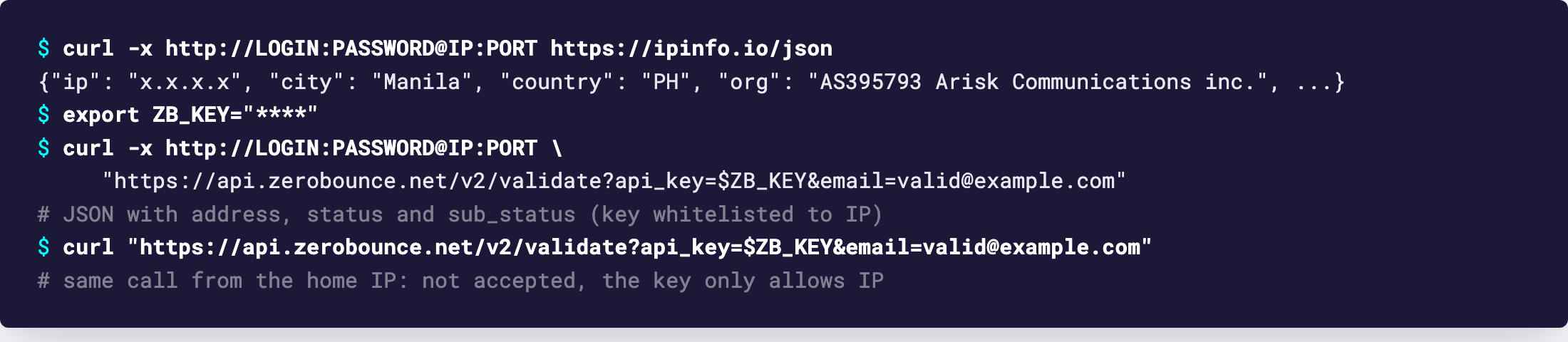
CleanTalk is two APIs with two endpoints. Anti-Spam methods (check_newuser, check_message, check_bot and friends) go as POST JSON to https://moderate.cleantalk.org/api2.0. Database methods such as spam_check are GET calls to https://api.cleantalk.org. Each product is priced separately. Through a proxy, both look like this:
# Database API: is this address or IP on the block lists? (last 6 months)
curl -x http://LOGIN:PASSWORD@IP:PORT \
     "https://api.cleantalk.org/?method_name=spam_check&auth_key=$CT_DB_KEY&[email protected]"

# Anti-Spam API: should this sign-up be allowed?
curl -x http://LOGIN:PASSWORD@IP:PORT \
     -H "Content-Type: application/json" \
     -d '{"method_name":"check_newuser","auth_key":"'"$CT_KEY"'",
          "sender_ip":"203.0.113.10","sender_email":"[email protected]",
          "js_on":1,"submit_time":15,
          "sender_info":{"REFFERRER":"https://example.com/signup","USER_AGENT":"Mozilla/5.0"}}' \
     https://moderate.cleantalk.org/api2.0
The Anti-Spam response carries allow (1 or 0), a codes field with reasons like BL, FORBIDDEN, FAST_SUBMIT or EMAIL_DOMAIN_DISPOSABLE, plus blacklisted, js_disabled and fast_submit. Note what sender_ip is: the visitor's address, supplied by you. The proxy IP never enters the scoring. If you accidentally pass the proxy's address as sender_ip, don't be surprised when spam_check flags it, because that method returns network type flags such as paid_vpn and tor.
Database API limits, from the method page: 100 calls per 60 seconds, 1,000 data elements per call, a recommended timeout of no more than 180 seconds. Bulk goes through a POST data field, comma-separated, and one request with two IPs counts as two checks. Email existence and disposable checks are GET-only, one address per call.
Python
CleanTalk's official Python lib is pip install cleantalk-python-antispam, imported as from cleantalk_python_antispam.cleantalk import CleanTalk, with CleanTalk(auth_key='yourkey') and ct.request(...). Its README names no HTTP library and no proxy option, so we won't promise the environment trick works there. For a guaranteed path, call the endpoints with requests and an explicit proxies=:
import os, requests

PROXY = "http://LOGIN:PASSWORD@IP:PORT"
proxies = {"http": PROXY, "https": PROXY}

body = {"method_name": "check_newuser", "auth_key": os.environ["CT_KEY"],
        "sender_ip": "203.0.113.10", "sender_email": "[email protected]",
        "js_on": 1, "submit_time": 15,
        "sender_info": {"REFFERRER": "https://example.com/signup", "USER_AGENT": "Mozilla/5.0"}}

r = requests.post("https://moderate.cleantalk.org/api2.0", json=body,
                  proxies=proxies, timeout=(5, 30))
print(r.json()["allow"], r.json().get("codes"))
5 Client dashboards in separate profiles
Agencies often hold a ZeroBounce and a CleanTalk account per client, each with its own billing and its own keys. Nothing in either product requires separate IPs for that. It is still tidier to give every client a browser profile with its own GeekProxy static IP. Then the address editing a client's whitelist is the same address their scripts will use.
- Firefox keeps proxy settings per profile and handles SOCKS with remote DNS
- Chrome follows the OS proxy; a separate proxy per window means
--proxy-server="http://IP:PORT"plus a separate user data directory - SOCKS5 with login and password does not work in Chromium browsers or Firefox. Use HTTP with login:password, or SOCKS5 with IP whitelist auth in your GeekProxy plan
6 Verify it works
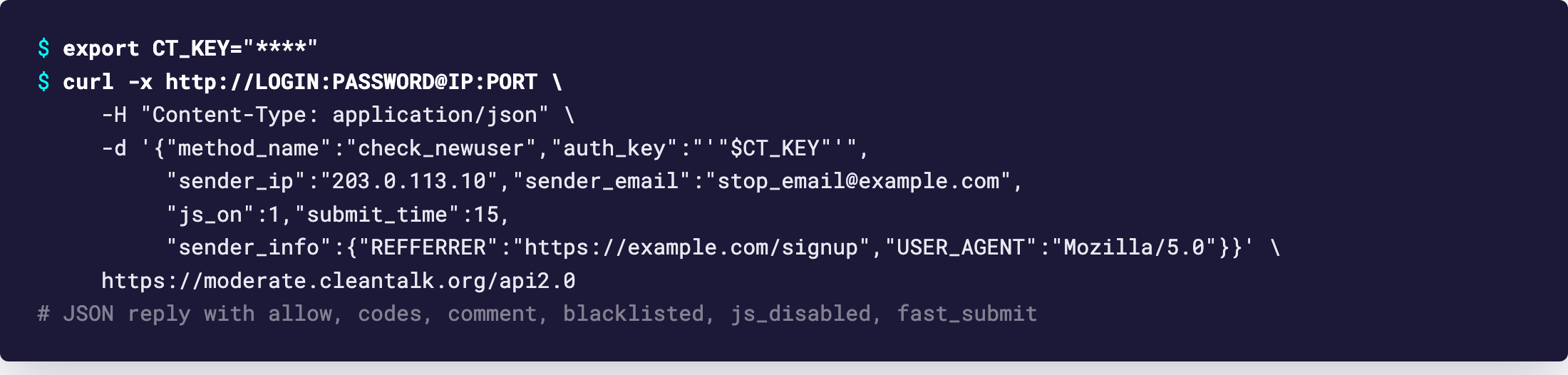
First curl -x http://LOGIN:PASSWORD@IP:PORT https://ipinfo.io/json. The IP must equal the Whitelist IP on the ZeroBounce key. Then the validate call from section 3, expecting a JSON with a status for the address. Then the same validate call without -x: with a whitelisted key it should not succeed from your home IP.
CleanTalk has no IP check to confirm, so success is simply a JSON reply with allow in it, and a sender_ip value that is the visitor's, not the proxy's.
7 Which GeekProxy product fits
This is JSON traffic measured in kilobytes, and the only thing that matters is that the IP never changes. Datacenter IPv4 is the cheapest static address for it. Pick ISP static if the egress must look like a home connection or match a firewall rule on your side. Residential Turbo, Residential Flex and mobile rotate and bill by traffic, which buys you nothing here and breaks a whitelisted key the moment the exit moves.
8 Common issues
ZeroBounce rejects a key that has a Whitelist IP
The call left from another address. Compare https://ipinfo.io/json through the proxy with the key's whitelist. On a rotating plan this is the expected outcome, move to a static IP.
I set ip_address to the proxy IP and nothing changed
Nothing should. That parameter describes the subscriber, not your connection. Pass the real sign-up IP or leave it empty.
CleanTalk flags my own traffic as paid_vpn
You fed the proxy address into sender_ip or into spam_check. Send the visitor's IP. CleanTalk classifies whatever address you give it.
Rate limit errors
ZeroBounce allows 80,000 validation requests per 10 seconds and blocks for a minute if you exceed it, and 200 bad-key requests per hour earn an hour's block. CleanTalk's Database API stops at 100 calls per 60 seconds. Both limits sit on the key. A second proxy changes nothing.
The ZeroBounce SDK ignores my proxy
The variable was set after Python started, or without a scheme. Export HTTPS_PROXY with http:// in front before launching, and for socks5h:// make sure requests[socks] is installed.
Get a static IP for CleanTalk and ZeroBounce
Datacenter and ISP addresses that stay put, HTTP and SOCKS5, no traffic meter.
Place an order