
Set up GeekProxy in email checkers
Desktop and self-hosted verifiers do the mailbox check themselves: they look up the MX record and talk SMTP to the recipient's server on port 25. Most home and office lines block that port, which is why these tools ship with a proxy dialog. This guide walks through Atomic Mail Verifier, DeskShare Smart Email Verifier and the open-source check-if-email-exists, and says plainly what a proxy can and cannot fix.
You'll need: an active GeekProxy Residential Turbo plan and the proxy credentials from your dashboard. Setup takes about 10 minutes per tool.
Get proxies1 Before you start
All three tools verify in stages. Syntax first, then the domain and its MX records, then the expensive part: an SMTP conversation with the destination server. EHLO, MAIL FROM, RCPT TO, and QUIT before anything is sent. The server's answer to RCPT TO is the verdict. That conversation needs outbound TCP 25.
Here is the honest part. Port 25 is the one port most residential ISPs close, and a proxy only helps if the proxy itself lets 25 through. Among GeekProxy products, mail ports are available on Residential Turbo, ask support for details. Residential Flex documents 25, 465 and 587 as closed, and we make no mail-port claims for ISP, datacenter or mobile plans.
One more caveat before you buy anything. Residential exits are end-user address ranges, the kind Spamhaus describes in its Policy Block List as ranges that should not be delivering unauthenticated SMTP directly. Some mail servers refuse or greylist the handshake from such an address even when port 25 is open. Verifiers then report "unknown" or a connection error, not "invalid". Plan for retries, not for a clean 100 percent.
What you'll need
- Active GeekProxy Residential Turbo plan
- Proxy credentials from your dashboard: gateway host, port, login, password
- Windows for Atomic Mail Verifier and Smart Email Verifier. check-if-email-exists runs on Linux and macOS as a CLI or in Docker
- Field Where it comes from
- Protocol SOCKS5 / HTTP
- Host rst.geekproxy.net
- Port 1080 (SOCKS5) or 8989 (HTTP)
- Username from the dashboard
- Password from the dashboard
2 Where to get your credentials
- Log in to your GeekProxy dashboard
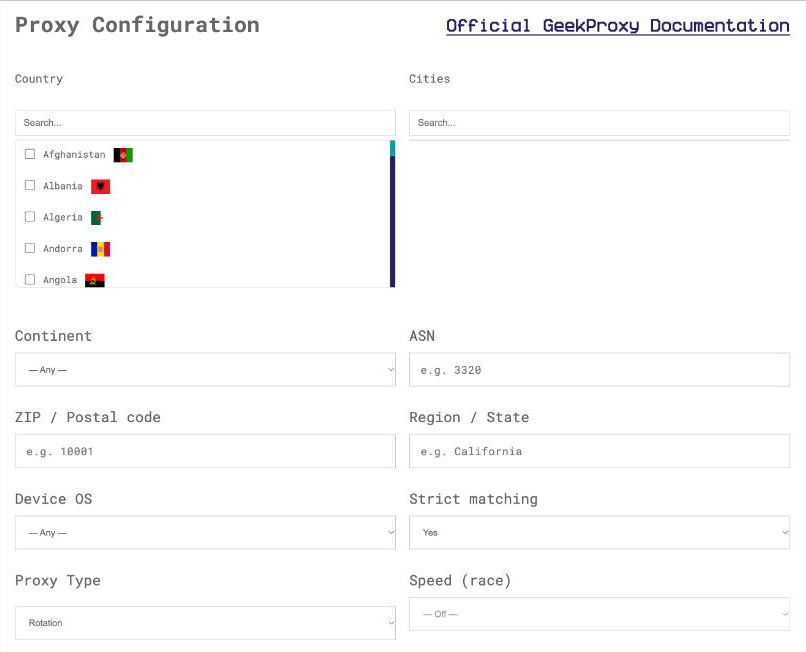
- Open the Residential Turbo plan and click Options. The Proxy Configuration panel builds the login string with country, city and session settings
- Copy the finished line from the Proxy List. The gateway is
rst.geekproxy.net, SOCKS5 on port 1080, HTTP on port 8989
Two suffixes from the Turbo doc matter for verifiers. session-<id> pins one exit for all threads, and time-<minutes> sets how long, up to 1440. Why pin at all? Greylisting. A server that says "try later" expects the retry from the same address, and a per-request rotation never comes back from the same place.
3 Atomic Mail Verifier
Windows only, multi-threaded, four check levels: syntax, domain and MX, mailbox existence over SMTP, and a catch-all test. The product page is blunt about the third level: it is "only possible if you have port 25 open". The FAQ adds that a proxy must be compatible with port 25.
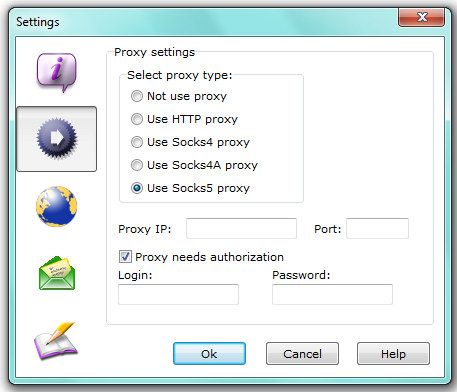
The proxy is a single global setting. The manual's path:
- Open Verify, then Common settings
- Switch to the Proxy settings tab. By default nothing is defined there
- Pick the type. The list is: not use proxy, HTTP proxy, Socks 4 proxy, Socks 4A proxy, Socks 5 proxy. Choose Socks 5 proxy
- Proxy IP:
rst.geekproxy.net. Port:1080 - Tick Proxy needs authorization and fill Login and Password
Separate fields, no scheme://user:pass@host string. If your GeekProxy plan is in IP whitelist mode, leave the authorization box unticked. The FAQ also lists the same screen as Settings, Common settings, Proxy, so don't panic if your build labels the menu differently.
The vendor's own port test, from the FAQ: open a command prompt and type telnet smtp.com 25. A banner means the port is open on that line. A timeout means your ISP blocks it, which is the normal state of affairs and the reason you are on this page.
4 Smart Email Verifier
An older Windows tool, but it has the clearest proxy dialog in the category, so it is worth showing. One rule first: it speaks SOCKS only. The vendor forum says it does not work through HTTP or FTP proxies, SOCKS 4, 4A and 5 are the options, and the usual SOCKS port is 1080.
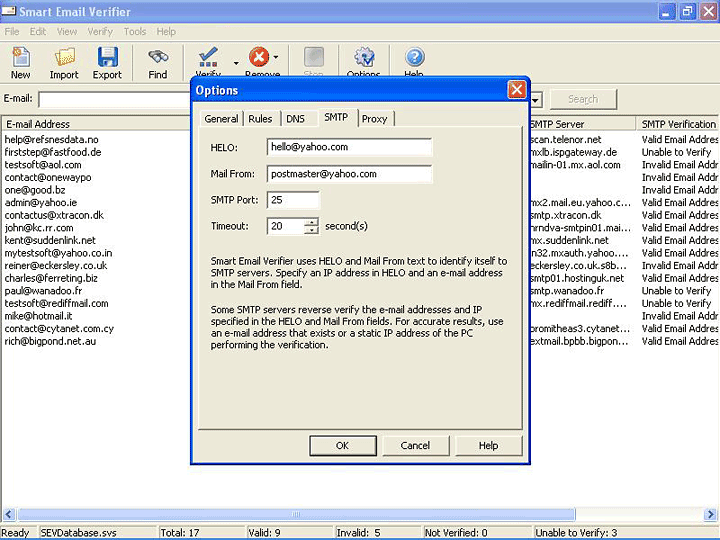
- Select Options from the Tools menu. The tabs are General, Rules, DNS, SMTP and Proxy
- On the Proxy tab tick My computer uses a proxy server to connect to the internet
- Under Proxy Server enter the IP Address
rst.geekproxy.netand Port Number1080, and pick SOCKS 5 - Tick Proxy Server requires authentication and enter the login and password
- On the General tab set the verification level to Syntax + Domain + SMTP. The other option, Syntax + Domain, never touches port 25 and never needed a proxy
The SMTP tab holds HELO, Mail From, SMTP Port and Timeout. Leave SMTP Port at 25. Real mail servers listen there and nowhere else for this handshake.
5 check-if-email-exists
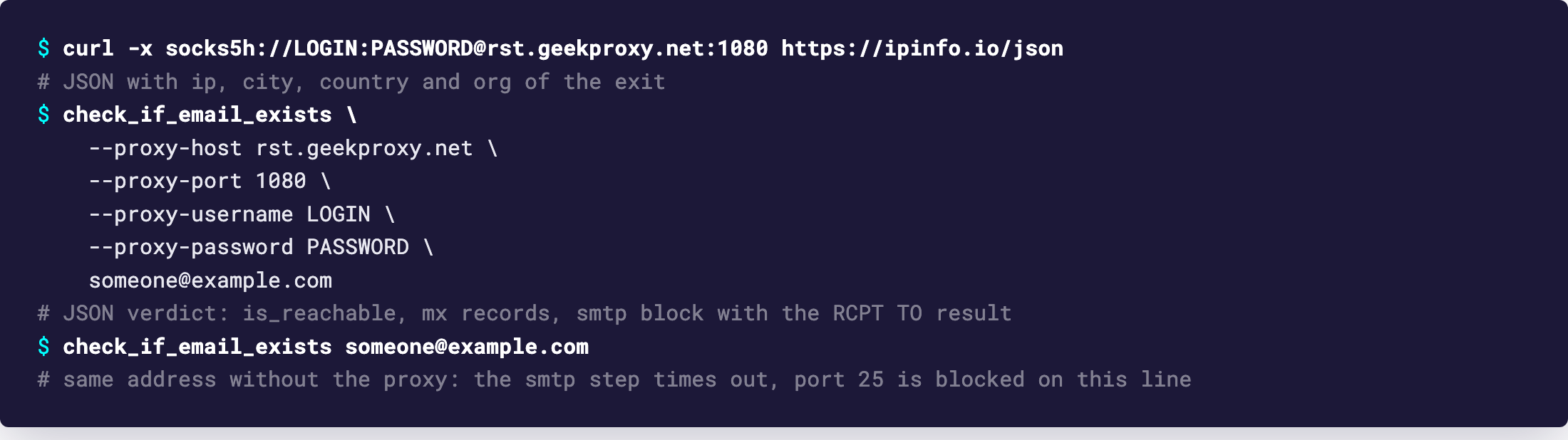
The open-source option for Linux and macOS, also known as Reacher. The README is as direct as the Windows vendors: "outbound port 25 must be open". The CLI takes the proxy as four flags, each with an environment variable twin. SOCKS5 only, login and password supported.
check_if_email_exists \
  --proxy-host rst.geekproxy.net \
  --proxy-port 1080 \
  --proxy-username LOGIN \
  --proxy-password PASSWORD \
  [email protected]
The port flag is only read when a host is set, and it defaults to 1080 anyway. --smtp-port exists too and defaults to 25. Changing it only makes sense against a test server you control. The same thing with environment variables, handy in Docker:
export PROXY_HOST=rst.geekproxy.net
export PROXY_PORT=1080
export PROXY_USERNAME=LOGIN
export PROXY_PASSWORD=PASSWORD
check_if_email_exists [email protected]
Running the HTTP backend instead? POST /v0/check_email accepts an optional proxy object with host, port, username and password, so the proxy can differ per request. The README also notes that anything beyond very small volumes needs SMTP-capable proxies. That is the whole reason this section exists.
6 Verify it works
Start outside the verifier. Through the proxy, request https://ipinfo.io/json with curl and the socks5h:// scheme. If that fails, the login or password is wrong and no verifier will do better.
Then run a tiny list: one address you know is live, one that is clearly made up at the same domain. The live one should come back valid, the invented one invalid. If both come back "unknown" or with connection errors, port 25 is not getting through from that exit. Try another session-<id>, which lands you on a different address, and if it persists, write to support with the target domains.
7 Which GeekProxy product fits
For the SMTP stage there is one answer: Residential Turbo, SOCKS5 on rst.geekproxy.net:1080 with a sticky session so greylisting retries come from the same exit. Mail ports are available on Residential Turbo, ask support for details. Residential Flex documents port 25 as closed, so it can only serve the syntax and MX stages, which never needed a proxy. We do not claim mail ports on ISP, datacenter or mobile plans. If you need those ports elsewhere, ask before buying.
8 Common issues
Every address fails with a connection error
Port 25 is closed somewhere on the path. Run the telnet test from section 3 without the proxy to confirm your ISP blocks it, then confirm the proxy settings are saved and the type is SOCKS5.
Smart Email Verifier does nothing with the proxy on
You entered an HTTP proxy. The vendor says it does not work through HTTP proxies at all. Switch to SOCKS 5 on port 1080.
Most results are "unknown"
That is the Spamhaus PBL effect from section 1. The destination server declined to talk to a residential address, or greylisted it. Lower the thread count, pin a session so retries reuse the exit, and accept that some domains will stay unknown.
Authorization fails although the login is right
Password typed into the wrong field, or the plan is in IP whitelist mode and your office IP isn't listed. Atomic Mail Verifier and Smart Email Verifier each have a separate authentication checkbox. Untick it if you use the whitelist.
Results change between two runs of the same list
The exit rotated between runs, and a server that greylisted the first address welcomed the second. Set session-<id> and time-<minutes> in the login for repeatable runs.
Get proxies for email verification
Residential Turbo with SOCKS5 and sticky sessions up to 24 hours, ready in seconds.
Place an order