
Set up GeekProxy in Key Collector 4
Key Collector pulls Yandex Wordstat, Yandex Direct, search results and suggestions through a table of proxies, and it hands those proxies to worker threads one by one. This guide walks through the Настройки → Сеть panel, the three accepted proxy formats, groups, and the one-thread-per-IP rule that decides whether your Yandex accounts survive the night.
You'll need: an active GeekProxy plan and the proxy credentials from your dashboard. Setup takes about 10 minutes.
Get proxies1 Before you start
Key Collector 4 is a Windows program with a Russian interface, so the labels below are quoted as you will see them on screen. The proxy table is global. Every collector (Wordstat, Direct, SERP, suggestions, LiveInternet) draws from it, and groups decide which task may use which proxies.
- Windows only, 64-bit only. The installer needs .NET Framework 4.8 and the Visual C++ 2015 to 2019 runtime
- The licence is perpetual and tied to one PC. A Key Collector 3 licence file works in version 4 at no extra cost
- Supported proxy types: HTTP, SOCKS4 and SOCKS5, each with an IPv4 or IPv6 flag. Login and password go into their own columns; for IP whitelist plans you just leave those columns empty
- The documentation describes the proxy address as an IP address. Per-IP plans give you exactly that, so start with those
- Key Collector keeps its own cookie store, separate from your browsers
What you'll need
- Active GeekProxy plan (ISP or datacenter for this tool)
- Proxy credentials from your dashboard: Host, Port, Username, Password
- Key Collector 4 installed and activated with its licence file
- At least as many proxies as you plan to run threads for Wordstat and Direct. More on that in section 5
- Field Where it comes from
- Protocol HTTP / SOCKS5
- Host IP or gateway hostname from the dashboard
- Port from the dashboard
- Username from the dashboard
- Password from the dashboard
2 Where to get your credentials
- Log in to your GeekProxy dashboard
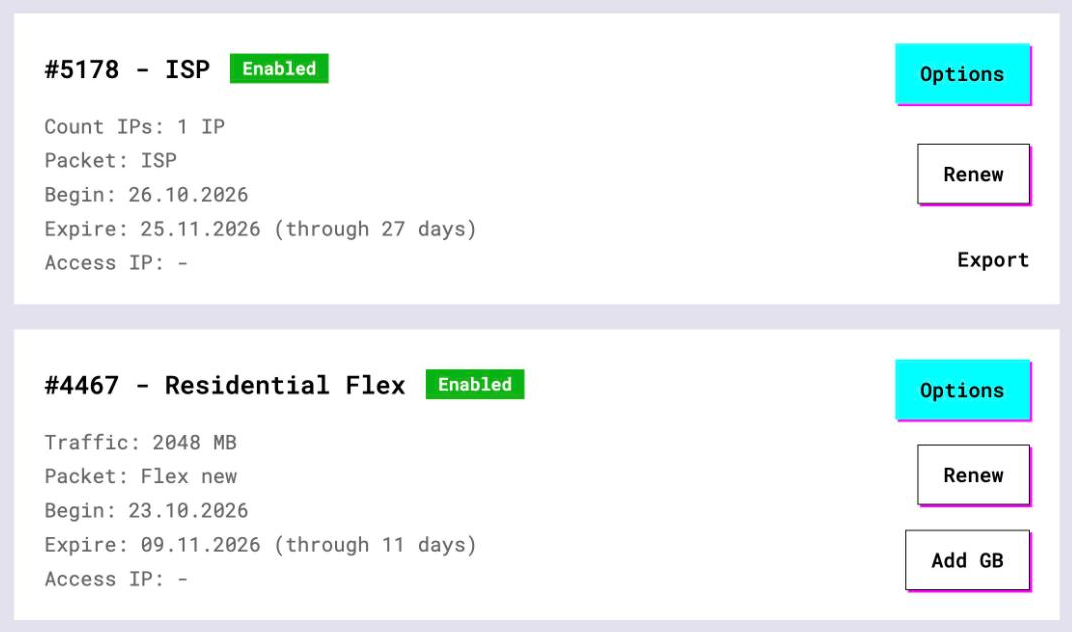
- Open the plan. For per-IP plans (datacenter, ISP) the IP list, ports, login and password sit right on the card, and Export hands you the whole list as text
- For residential and mobile plans click Options. The Proxy Configuration panel builds the login string with your country, city and session settings. Copy the finished line from the Proxy List
Keep the exported list open in a text editor. Key Collector wants address and port first, then login and password, so you will probably rearrange the lines once before pasting.
3 Add proxies in Настройки → Сеть
Open the program settings and pick the Сеть panel. The proxy table lives at the bottom of it. Tick Использовать прокси-серверы first. This is the master switch, and with it off the collectors ignore the table completely.
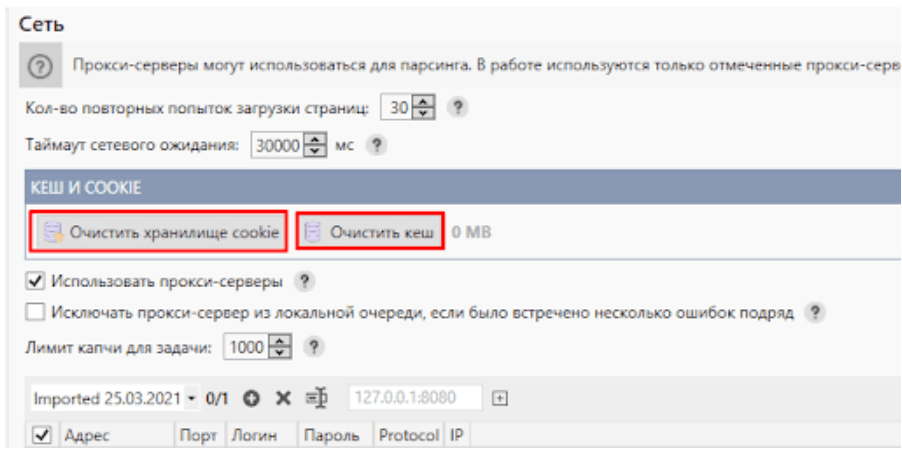
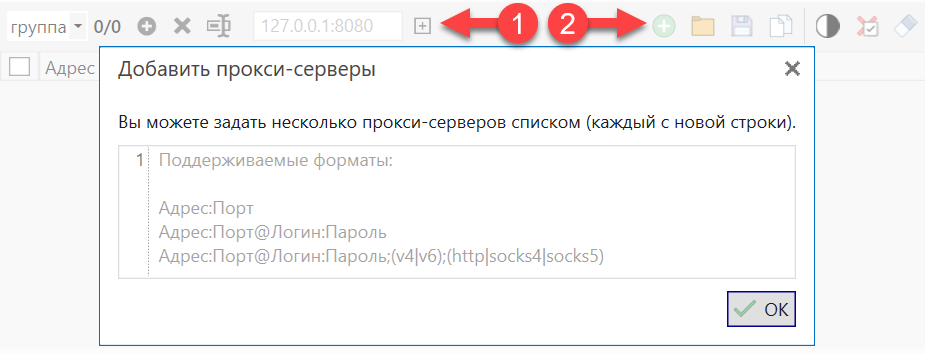
The table toolbar has a group dropdown, a counter like 2/3 (active rows out of total), and a single-entry field with the placeholder 127.0.0.1:8080. Next to it: a plus button and icons for adding a list, opening, saving and copying. For a whole plan, use the list icon. It opens a window titled Добавить прокси-серверы, where you paste one proxy per line in any of three formats:
Адрес:Порт
Адрес:Порт@Логин:Пароль
Адрес:Порт@Логин:Пароль;(v4|v6);(http|socks4|socks5)

IP:PORT@LOGIN:PASSWORD;v4;http
185.123.45.68:PORT@LOGIN:PASSWORD;v4;http
185.123.45.69:PORT@LOGIN:PASSWORD;v4;socks5
Note the order. Host and port come first, login and password follow after an @, the reverse of what most tools expect. The third form also sets the IP version and the protocol, so the sample lines land in the table fully configured.
After the import each proxy is a row with the columns Адрес, Порт, Логин, Пароль, Protocol and IP. The checkbox at the start of a row makes it active. Only ticked rows are used during collection; the red or green row colour just mirrors that tick. If you pasted the short Адрес:Порт@Логин:Пароль form, set the protocol afterwards: right-click the Protocol column header and pick HTTP, Socks 4 or Socks 5 for all selected rows at once.

Login and password are mandatory for password-protected proxies, the docs say so in plain words. On a GeekProxy plan switched to IP whitelist, add your current public IP in the dashboard and leave both columns empty.
4 Groups, limits and error handling
Proxies sit in groups, chosen from the dropdown above the table. The Ограничения использования block lets you allow or forbid each group for particular tasks. The documentation's own example is dedicated IPv4 proxies for demanding jobs next to cheap IPv6 proxies for the rest. In GeekProxy terms: an ISP group for Wordstat and Direct, a datacenter group for SERP and suggestions.
Three more settings on the same panel matter:
- Исключать прокси-сервер из локальной очереди, если встречено несколько ошибок подряд. A proxy that fails several times in a row leaves the task's local queue until the collection is restarted
- Лимит капчи для задачи. The same exclusion after N captchas. The docs warn against a low threshold, because a captcha now and then is normal
- Таймаут сетевого ожидания and Кол-во повторных попыток загрузки страниц. Don't set the timeout too small; Yandex is not always fast
The queue model is simple. A task copies the allowed active proxies into a local queue and threads pull from it in turn. That is why a list of distinct IPs beats one rotating entry here.
5 Threads and Yandex accounts
The official advice for Wordstat and Direct is blunt: no more than one thread per IP address, and never more threads than active Yandex accounts. Ten accounts, ten proxies, ten threads. The thread count sits in the task settings under Настройки → Парсинг, next to the account list.
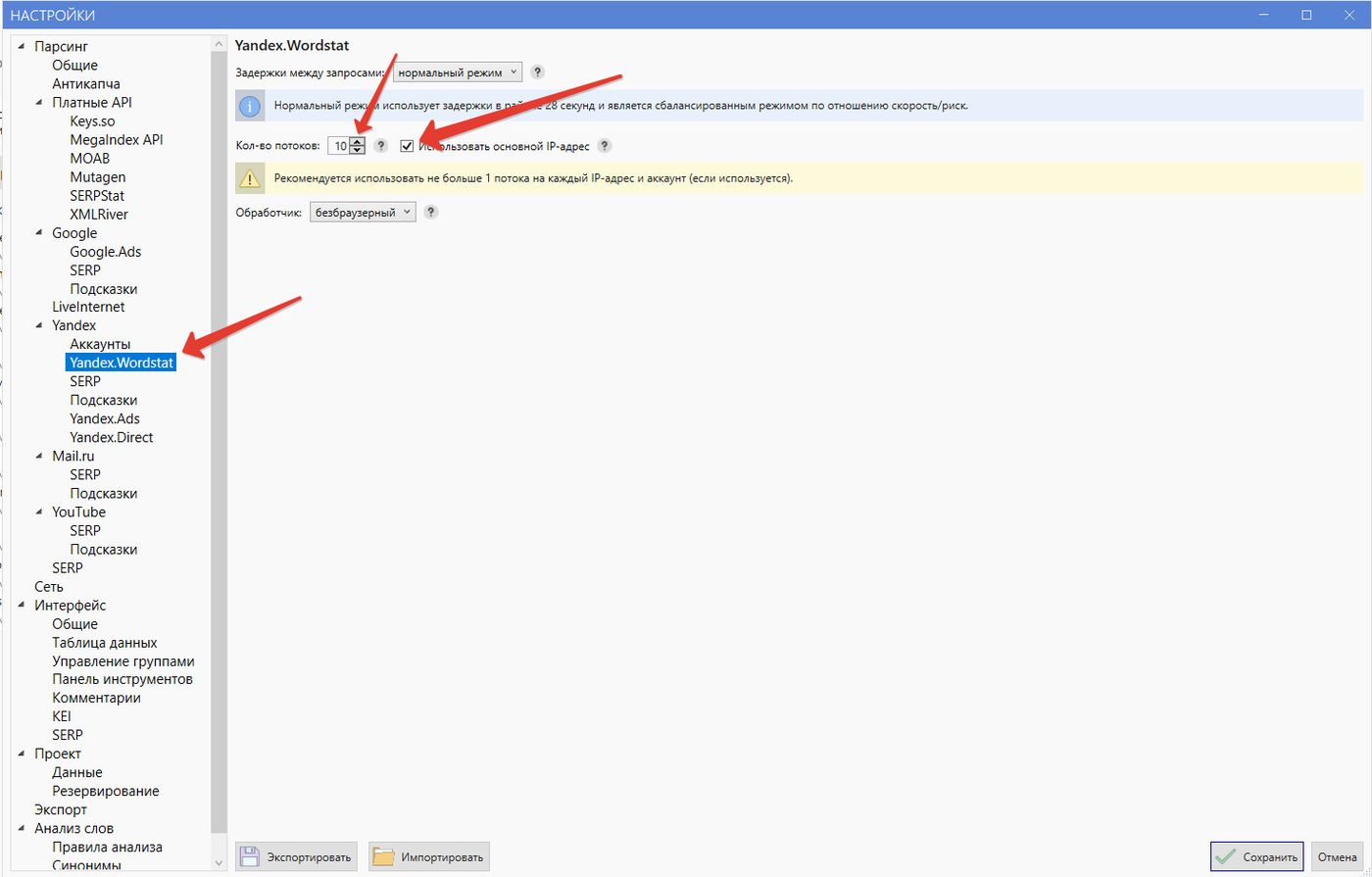
Two details here bite people more often than you'd think. First, a Yandex account gets a proxy at login and keeps it in memory until you restart the program. Editing the table afterwards changes nothing for accounts already logged in; press Сбросить авторизацию on the accounts page and let them log in again.
Second, Настройки → Парсинг → Общие has a thread reduction mode. The default lowers the thread count when fewer proxies or accounts remain than threads running. The documentation calls the never-reduce mode dangerous: the last surviving proxy would absorb every thread and the per-proxy delay would collapse.
Static proxies can also be listed directly with Yandex accounts. Those are used regardless of anything on the Сеть panel, including the master switch. Handy for a few long-lived accounts, confusing when you forget them.
6 Verify it works
There is no proxy checker inside Key Collector. The vendor's error page says automatic checkers are unreliable and tells you to test a proxy by hand in a browser. Set the proxy in the browser's network settings, open internet.yandex.ru or https://ipinfo.io/json, and compare the IP with and without it. A 407 means the login or password is wrong.
From a terminal the same check is one line:
curl -x http://LOGIN:PASSWORD@IP:PORT https://ipinfo.io/json
Then run a small Wordstat task, 20 or 30 phrases, and watch the event log. Network errors there name the proxy that failed. A clean log means the table is in use.
7 Which GeekProxy product fits
Key Collector wants a list of distinct, stable addresses: one thread per IP, one account pinned to one proxy, failing proxies dropped from the queue. That is the per-IP model, so ISP static is the first choice for Wordstat and Direct, where accounts live on the same clean IP for months. For SERP and suggestions a group of datacenter IPv4 does the job at a lower price, the two-group split the documentation itself describes. A rotating residential gateway would put every thread behind one table row, and the docs describe the address as an IP, so we don't recommend it here.
8 Common issues
Proxy errors in the log right after start
Nine times out of ten the login or password is wrong, or the plan is in IP-whitelist mode and your IP isn't on the list. A 407 in the browser test confirms it.
Everything slows down and one proxy takes all the load
You switched the thread reduction mode in Настройки → Парсинг → Общие to the never-reduce option. Put the default back. With it, the thread count follows the number of proxies and accounts that are still alive.
I replaced the proxies but an account still uses the old one
Expected. The proxy chosen at login stays with the account until restart. Press Сбросить авторизацию for the affected accounts, or restart Key Collector.
Proxies vanish from the queue halfway through a run
Consecutive network errors or the captcha limit excluded them until the next restart of the collection. Raise Лимит капчи для задачи a little and check the timeout isn't too tight.
Captcha storms and banned Yandex accounts
More threads than IPs, or more threads than accounts. Go back to section 5. One thread per IP is the cheapest fix there is.
Get proxies for Key Collector
Static ISP and datacenter IPv4 lists with HTTP and SOCKS5, no traffic counter, ready in seconds.
Place an order