
Use GeekProxy with Python requests and curl
Two tools cover most scripting work: curl for a quick check from the terminal, requests for anything that runs on a schedule. Both take the proxy as a URL, and both get the SOCKS5 DNS detail wrong unless you tell them otherwise.
You'll need: an active GeekProxy plan and the proxy credentials from your dashboard. First working request takes under a minute.
Get proxies1 Before you start
Both tools speak to the proxy the same way. You give them a proxy URL, they open a CONNECT tunnel for HTTPS targets or forward plain HTTP requests, and the target site sees the proxy IP. Nothing else on your machine is affected.
- The proxy URL format is
scheme://user:password@host:port. The scheme ishttp://for an HTTP proxy,socks5://orsocks5h://for SOCKS5 - If your GeekProxy plan is set to IP whitelist, drop the
user:password@part - Special characters in the password go URL-encoded. An
@becomes%40, a colon becomes%3a
What you'll need
- Active GeekProxy plan (datacenter, ISP or residential)
- Proxy credentials from your dashboard: Host, Port, Username, Password
- curl 7.21 or newer (macOS and most Linux distributions ship it; Windows 10 and 11 include it too), Python 3.8 or newer with
requestsinstalled
- Field Where it comes from
- Protocol HTTP / SOCKS5
- Host IP or gateway hostname from the dashboard
- Port from the dashboard
- Username from the dashboard
- Password from the dashboard
2 Where to get your credentials
- Log in to your GeekProxy dashboard
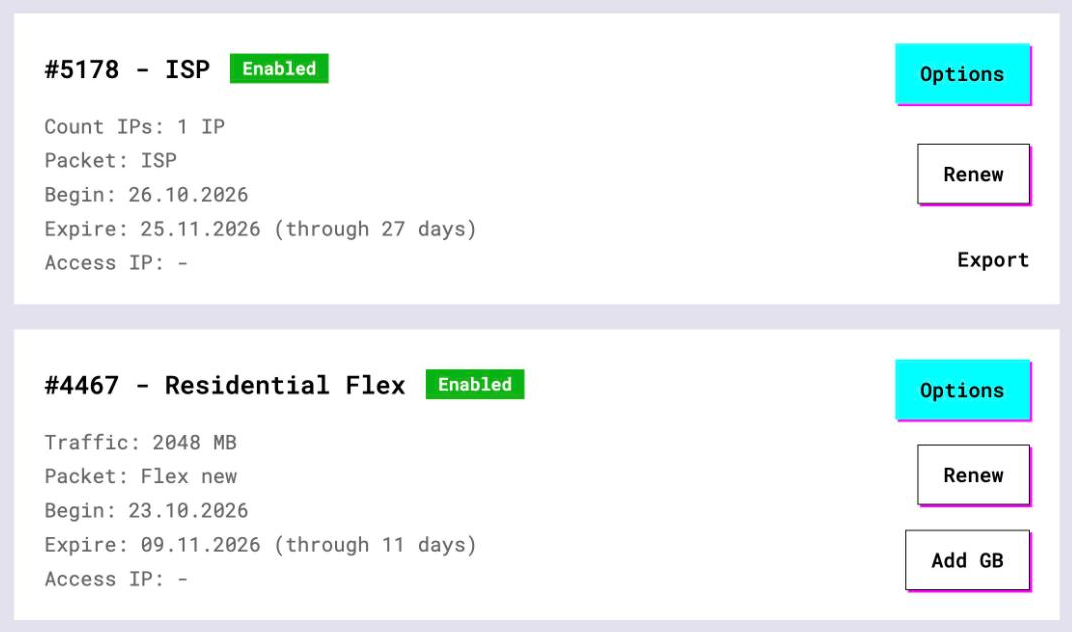
- Open the plan. For per-IP plans (datacenter, ISP) the IP list, ports, login and password sit right on the card, and Export hands you the whole list as text
- For residential and mobile plans click Options. The Proxy Configuration panel builds the login string with your country, city and session settings. Copy the finished line from the Proxy List
Scripts that run unattended can skip the copy-paste. The GeekProxy API returns the same proxy list as JSON, see the automation guide.
3 curl
One flag does the job: -x (long form --proxy). Put the full proxy URL after it and the request goes through the tunnel.
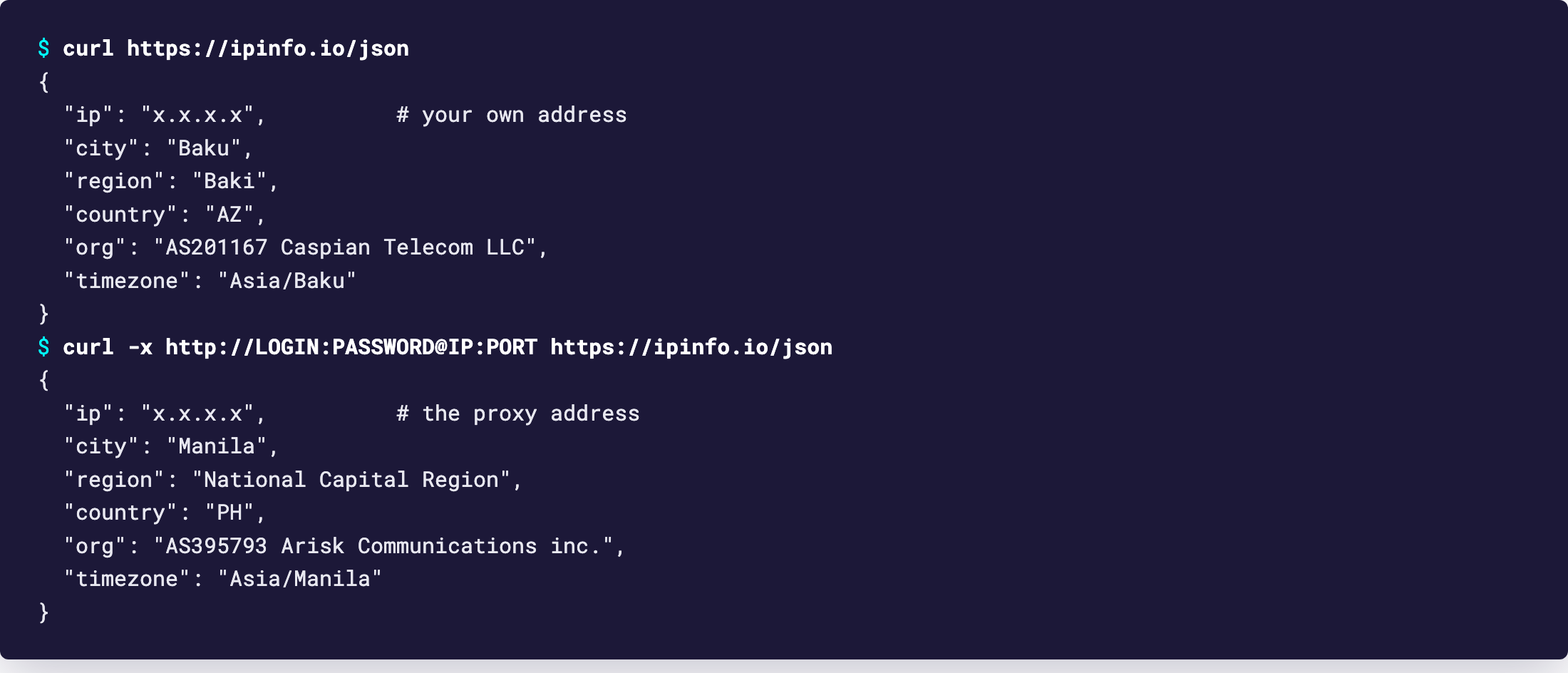
curl -x http://LOGIN:PASSWORD@IP:PORT https://ipinfo.io/json
The response is a tiny JSON with the IP the site sees. If it matches your proxy, you are done. Three details from the curl manual worth knowing before you build on this:
- No scheme in the proxy string means HTTP proxy. No port means 1080, not 8080 or 3128
- Credentials can live outside the URL:
-U LOGIN:PASSWORD(long form--proxy-user). Handy when the password has odd characters - Command-line arguments are visible to other users on the same machine through the process list. On a shared server, use an environment variable instead (next section)
Timeouts
curl waits forever by default. Add two flags to every scripted call: --connect-timeout 10 caps the connection phase (DNS, TCP, TLS), --max-time 60 caps the whole transfer. With a wrong port you get exit code 28 after ten seconds instead of a hung cron job.
curl --proxy IP:PORT --proxy-user LOGIN:PASSWORD \
     --connect-timeout 10 --max-time 60 https://ipinfo.io/json
Environment variables
Set https_proxy once and every curl call in that shell uses it. The same variables are read by requests, pip, git and most other tools, so this is the easiest way to proxy a whole script without touching its code.
export https_proxy="http://LOGIN:PASSWORD@IP:PORT"
export http_proxy="http://LOGIN:PASSWORD@IP:PORT"
curl https://ipinfo.io/json
Two quirks from the manual. Lower-case variables win over upper-case ones, and http_proxy exists only in lower case. Also check ~/.curlrc: a forgotten proxy = line there applies to every call silently.
4 Python requests
requests takes a proxies dictionary with one entry per scheme. Pass it on every call. Always set a timeout too, because requests has none by default and a stalled connection can hang your script for minutes.
import requests

PROXY = "http://LOGIN:PASSWORD@IP:PORT"
proxies = {"http": PROXY, "https": PROXY}

r = requests.get("https://ipinfo.io/json", proxies=proxies, timeout=(5, 30))
print(r.json())        # {'ip': 'x.x.x.x', 'city': 'Manila', 'region': 'National Capital Region', 'country': 'PH', 'org': 'AS395793 Arisk Communications inc.', ...}
The tuple (5, 30) means five seconds to connect, thirty to read. The docs note that the connect timeout applies per IP address, so a host with IPv4 and IPv6 records can take twice as long before giving up.
Sessions and a trap
A requests.Session keeps the TCP connection open between calls, which is faster and, with a rotating plan, keeps the same exit IP for as long as that connection lives. The trap: session.proxies is overridden by environment proxies. The official docs say so in plain words. If https_proxy is set anywhere in the environment, your session setting loses. Pass proxies= to each request, or create the session with trust_env = False.
s = requests.Session()
s.trust_env = False            # ignore http_proxy / https_proxy from the environment
s.proxies.update(proxies)

for url in urls:
    r = s.get(url, timeout=(5, 30))
requests also reads http_proxy, https_proxy, all_proxy and no_proxy from the environment, upper or lower case. For a one-off script that is the shortest path: export the variable and call requests.get() with no proxy argument at all.
5 SOCKS5 and DNS
SOCKS5 needs one extra package: pip install "requests[socks]". Then change the scheme. Here is where most people lose an hour.
socks5://resolves the target hostname on your machine and sends the proxy an IP. Your DNS provider sees every domain you visit, and a geo-balanced site may hand you an IP that is wrong for the proxy's countrysocks5h://sends the hostname to the proxy and lets it resolve. This is what you want almost every time
curl follows the same rule and spells it the same way. --socks5-hostname is the long-hand equivalent of the socks5h:// prefix.
# curl
curl -x socks5h://LOGIN:PASSWORD@IP:PORT https://ipinfo.io/json

# requests
PROXY = "socks5h://LOGIN:PASSWORD@IP:PORT"
proxies = {"http": PROXY, "https": PROXY}
HTTP proxies have no such split: a CONNECT request always carries the hostname, so the proxy resolves it. If you don't need SOCKS for a specific reason, HTTP is one less thing to get wrong.
6 Verify it works
Request https://ipinfo.io/json through the proxy and once more without it. The ip field must differ, and with the proxy the country, region and org fields describe the proxy network, not yours. Different IP, you're through.
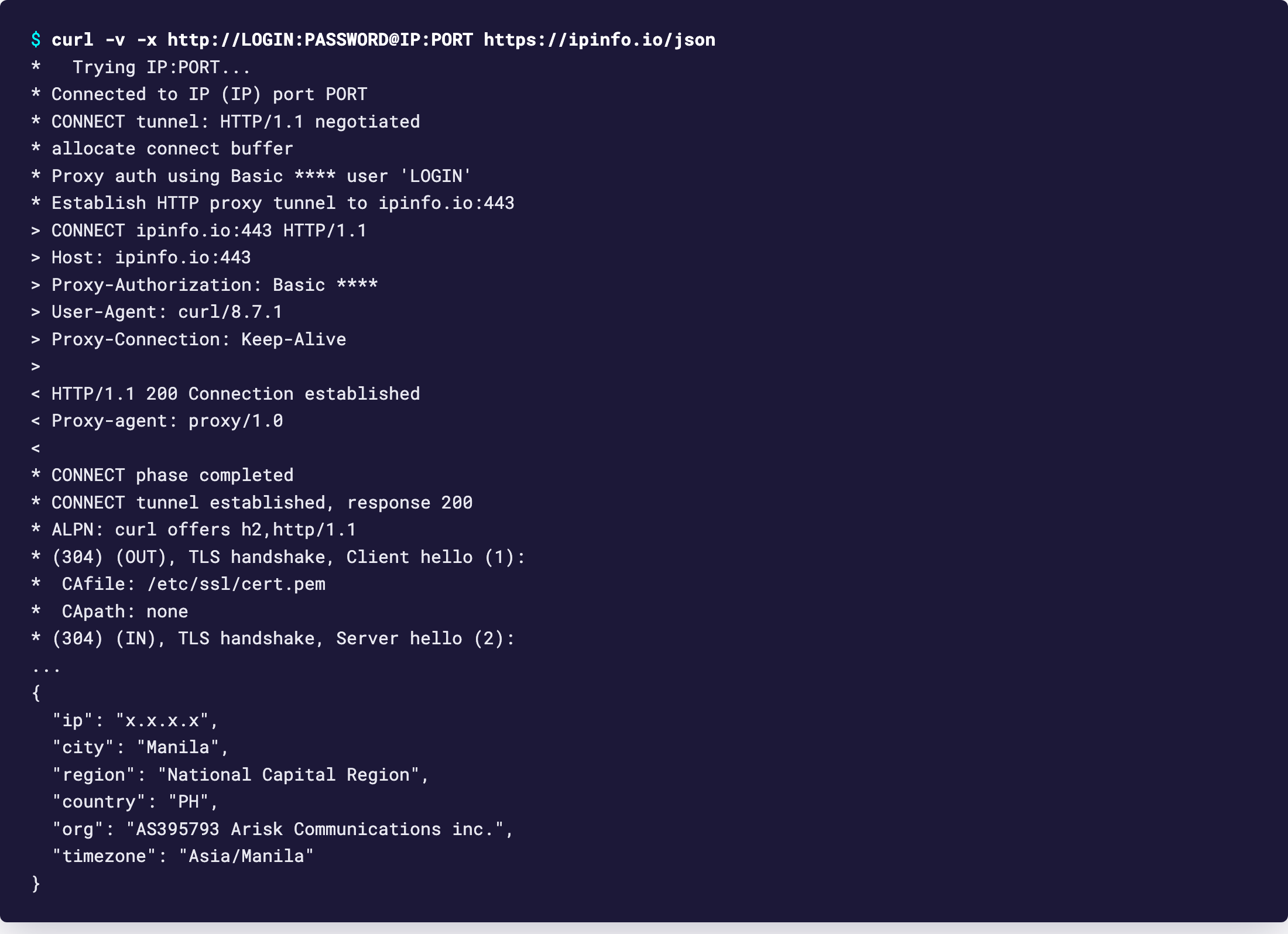
A second check that saves debugging later: run curl with -v. The log should show CONNECT geekproxy.io:443 HTTP/1.1, the line Proxy-Authorization: Basic and the proxy's 200 Connection established. If the 200 is missing, the problem is between you and the proxy, not with the target site.
7 Which GeekProxy product fits
Scraping at volume wants many different exits, so Residential Turbo or Residential Flex in rotating mode: every new connection can land on another home IP, and a sticky session in the username holds one IP for as long as a login flow needs it. Polling an API that whitelists your address, or anything that must come from the same IP for weeks, is a job for ISP static or datacenter IPv4, where the per-IP plan has no traffic counter at all. Flex is TCP only. That is fine here, since requests and curl never use UDP.
8 Common issues
curl: (7) Failed to connect, or (28) Timeout was reached
The proxy host or port is wrong, the plan has expired, or a firewall blocks the port. Check the dashboard first, then try the same host:port with a plain nc -vz host port.
407 Proxy Authentication Required
Login or password is off, or the plan is in IP-whitelist mode and your current IP isn't on the list. Passwords with @, : or # must be percent-encoded inside the URL, or passed with -U in curl.
requests ignores my session proxies
An environment proxy is set and wins over session.proxies. Either unset the variable, set trust_env = False on the session, or pass proxies= on every call.
Missing dependencies for SOCKS support
That is requests telling you PySocks isn't installed. Run pip install "requests[socks]" in the same interpreter your script uses.
Every request shows the same IP on a rotating plan
Normal with a Session: keep-alive reuses the connection, and the exit sticks to the connection. Close the session, or make calls without one, and the next connection rotates.
Get proxies for your scripts
Rotating residential by the gigabyte, or static ISP and datacenter IPs with no traffic limit.
Place an order