
Set up GeekProxy in Screaming Frog SEO Spider
Screaming Frog takes exactly one proxy, applies it to every request the program makes, and needs a restart to switch it on. That makes it a poor fit for proxy lists and a very good fit for a single rotating gateway. This guide covers the Settings window on Windows, macOS and Linux, the six fields in the Proxy pane, and the two restart traps.
You'll need: an active GeekProxy plan and the proxy credentials from your dashboard. Setup takes about 3 minutes plus one restart.
Get proxies1 Before you start
The SEO Spider runs on Windows, macOS and Ubuntu Linux, 64-bit only. Version 24.3 is current as this is written. Without a licence it crawls up to 500 URLs per crawl, and the Proxy pane is in the general Settings window, so the free build is enough to follow along.
- Only one proxy server can be configured. There is no list, no rotation and no checker inside the program
- No exceptions. The docs put it plainly: either all HTTP and HTTPS traffic goes via the proxy, or none of it does
- You must restart for the change to take effect. The Settings window reminds you, and offers to do it for you
- The Address field takes a hostname (the official example is a hostname with port 3128), so a gateway address works as well as an IP
- Authentication is a Username and Password pair under Use Proxy Credentials. The documentation only talks about HTTP proxies; SOCKS is not mentioned, so don't count on it
What you'll need
- Active GeekProxy plan (Residential Turbo, ISP or datacenter)
- Proxy credentials from your dashboard: Host, Port, Username, Password
- Screaming Frog SEO Spider, free or licensed, on any of the three platforms
- Field Where it comes from
- Protocol HTTP
- Host IP or gateway hostname from the dashboard
- Port from the dashboard
- Username from the dashboard
- Password from the dashboard
2 Where to get your credentials
- Log in to your GeekProxy dashboard
- Open the plan. For per-IP plans (datacenter, ISP) the IP list, ports, login and password sit right on the card, and Export hands you the whole list as text. Pick one address; Screaming Frog can only use one
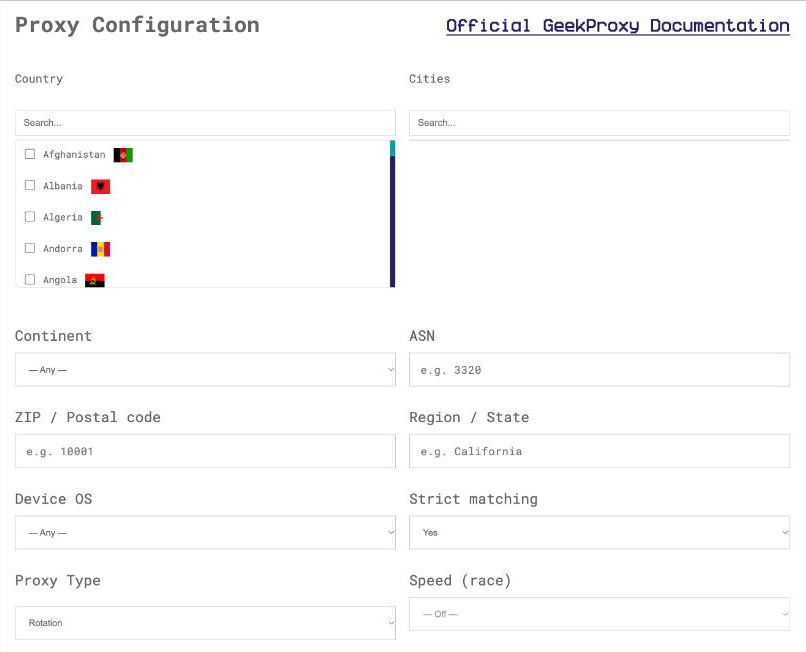
- For residential and mobile plans click Options. The Proxy Configuration panel builds the login string with your country, city and session settings. Copy the finished line from the Proxy List
Residential plans are the natural match here, since one gateway entry rotates exits on its own. Choose the country in Options, decide between rotating and sticky, and note that the result is a host, a port, a long username and a password. Those four values map one to one onto the Proxy pane.
3 Open the Proxy pane
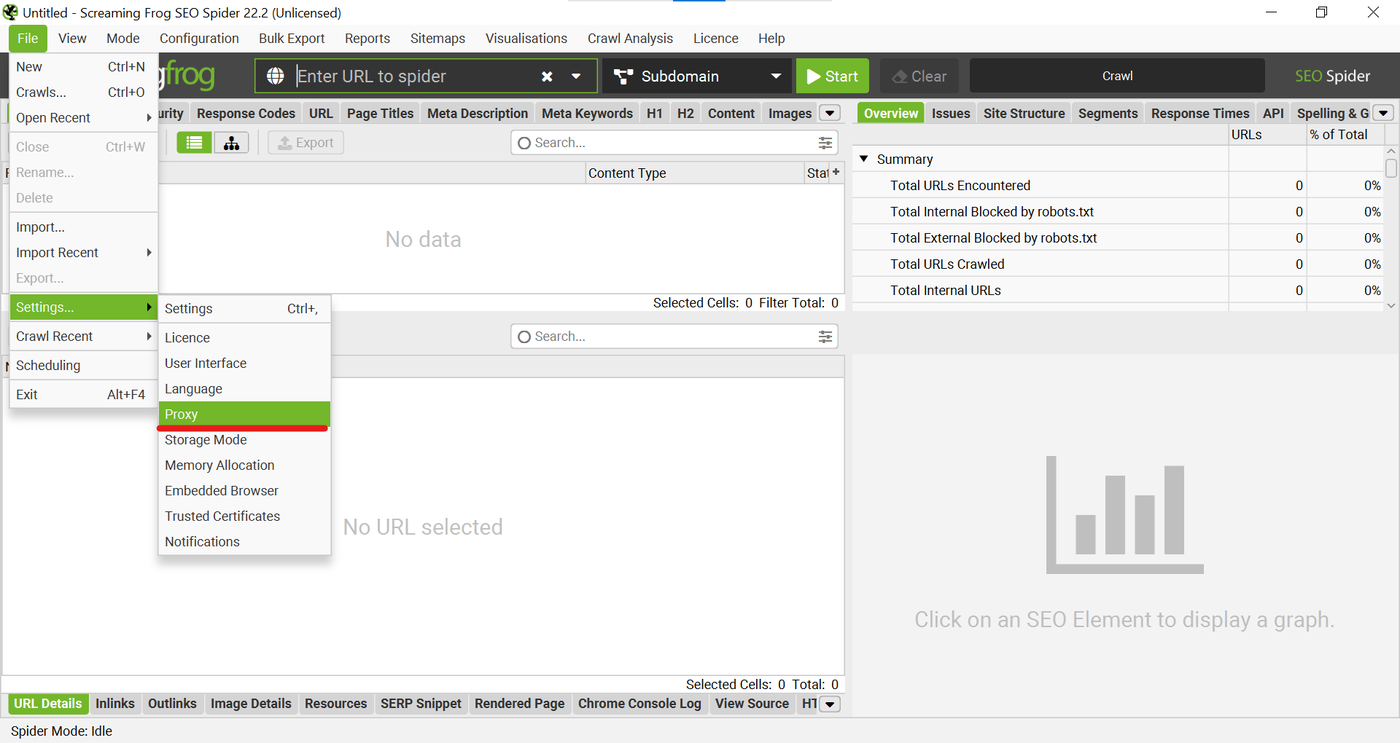
The path depends on the platform, and it moved in a recent version, so older forum answers point to the wrong menu.
- Windows and Linux: File > Settings > Proxy
- macOS: Screaming Frog SEO Spider > Settings > Proxy, the application menu at the left of the menu bar
A window titled Settings opens with a list down the left: Licence, User Interface, Language, Proxy, Storage Mode, Memory Allocation, Embedded Browser, Trusted Certificates. Click Proxy. The helper text on the right says proxies are typically not required for crawling websites, which is true, and then shows the fields anyway.
4 Fill in the fields and restart
- Tick Use Proxy Server
- Address: the host from your dashboard, or the gateway hostname from a residential plan. A green tick appears when the value parses
- Port:
PORT. Another green tick - Tick Use Proxy Credentials, then fill Username with
LOGINand Password withPASSWORD. For a plan in IP-whitelist mode leave this box unticked - A banner appears: Please restart for these changes to take effect. Press OK and Restart
Plain OK saves the values without restarting, and that is where most "it doesn't work" reports come from. The proxy is stored but not active until the next launch. If you clicked OK by habit, quit and start the program again.
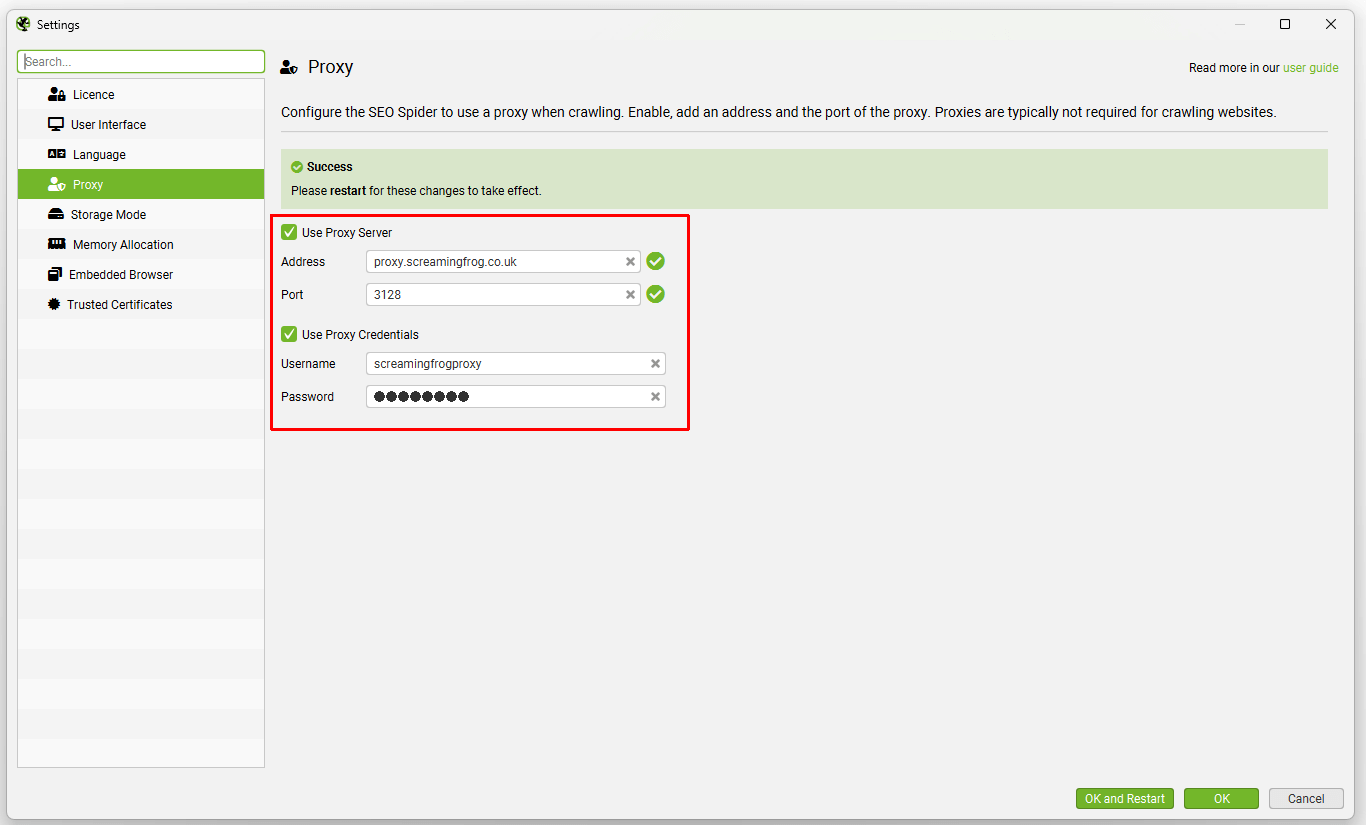
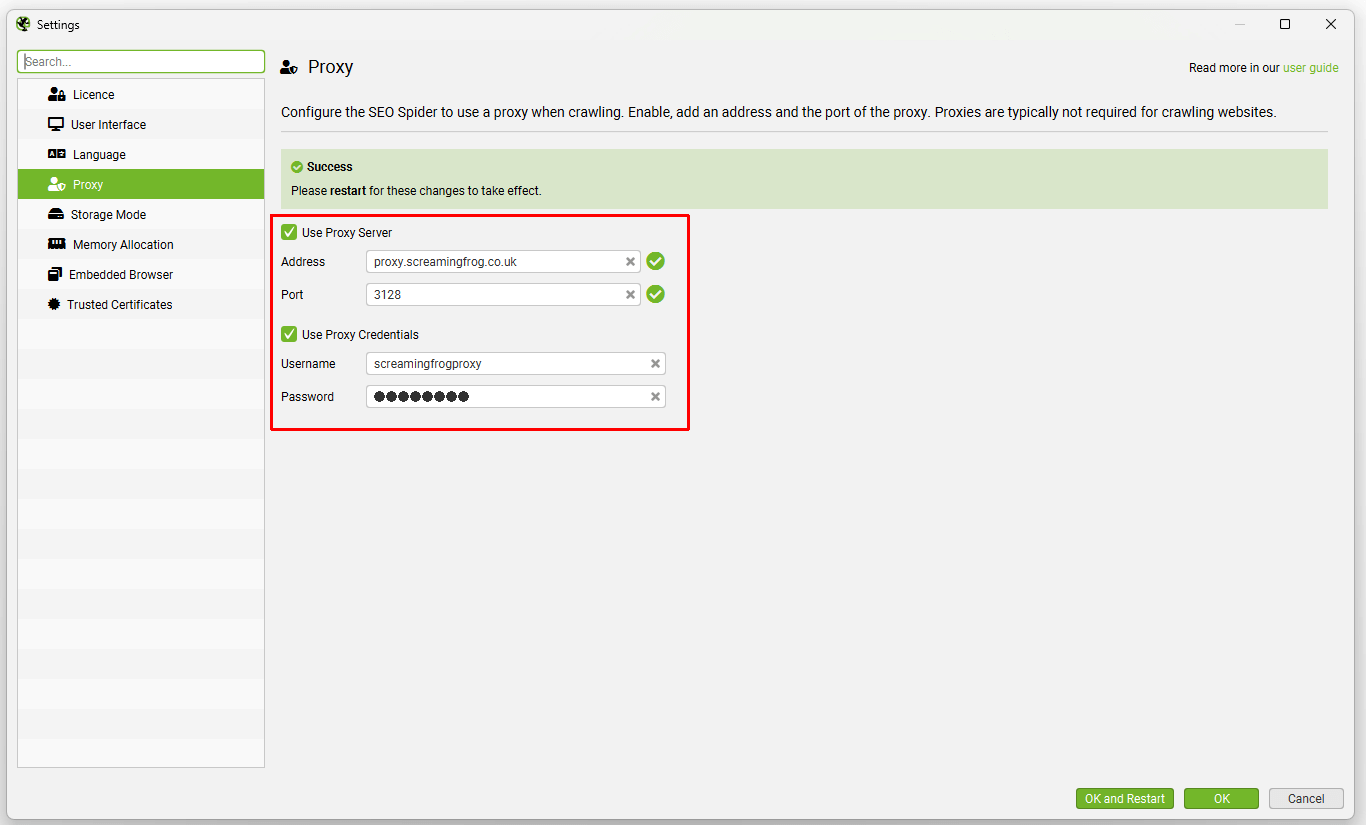
There is no single user:pass@host:port string to paste. Four separate fields, every time. Keep the dashboard tab open next to the Settings window and copy them one by one.
5 One proxy, all traffic
Because the setting has no exceptions, more than the crawl goes through the proxy. The FAQ lists two consequences. First, Google Analytics and Search Console authorisation can break: the OAuth flow redirects to localhost, and a proxy that intercepts that redirect kills the sign-in. Connect those integrations before you enable the proxy, or disable it for the minute it takes.
Second, a corporate or SSL-intercepting proxy triggers a PKIX Certificate Path Error, because the Spider does not trust such proxies by default. The fix is to add the proxy's certificate under Trusted Certificates in the same Settings window. A GeekProxy endpoint does not intercept TLS, so with it you won't see this error. We mention it because people hit it when switching between an office proxy and ours.
Whether the headless Chromium used for JavaScript rendering follows the proxy setting is not covered by the rendering guide. If rendered crawls must come from the proxy IP, test it (next section) before relying on it.
6 Verify it works
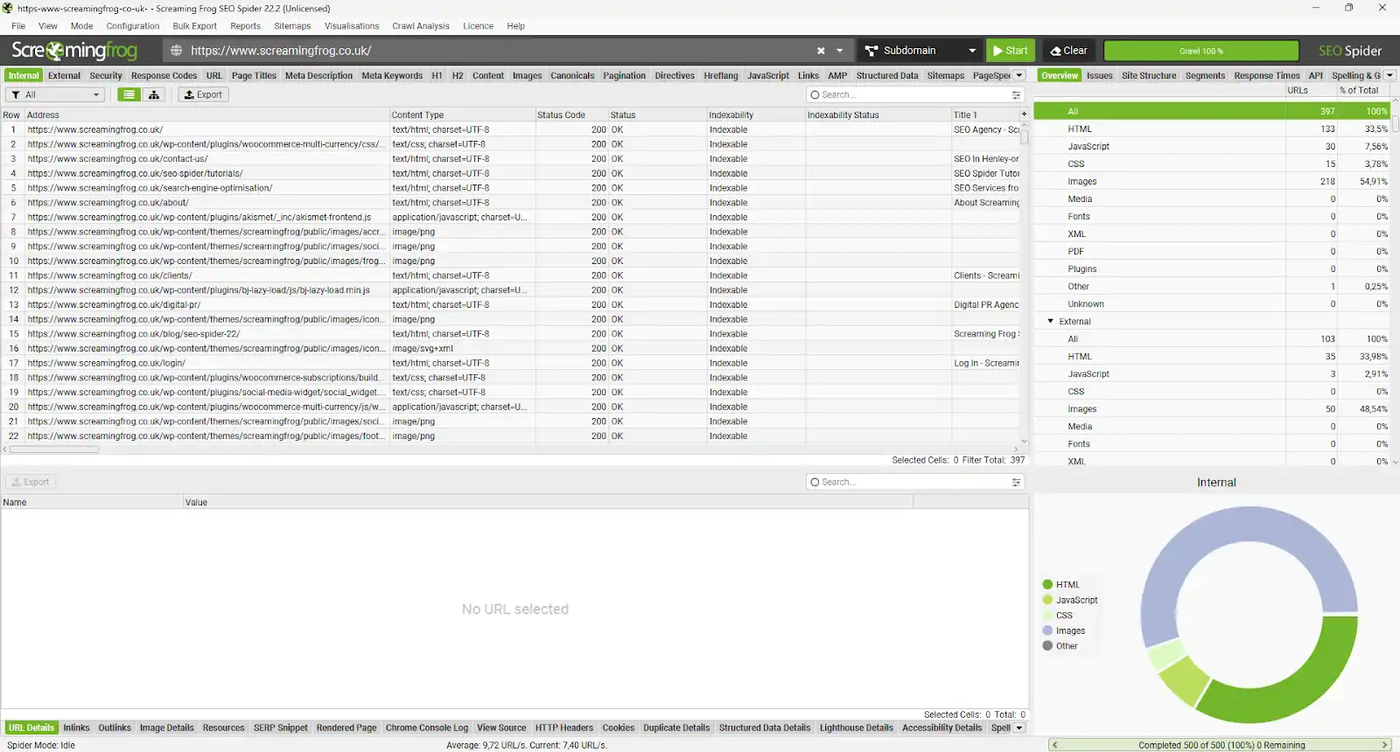
After the restart, crawl https://ipinfo.io/json as a single URL. A Status Code of 200 in the main list shows the request went through the proxy and the proxy let it out. Then open the same URL in a normal browser without a proxy and compare: the address the Spider saw must differ from yours. For a fuller picture, crawl a site whose access log you can read and look at the client IPs.
The same check from a terminal, for when you want to separate a proxy problem from a Spider problem:
curl -x http://LOGIN:PASSWORD@IP:PORT https://ipinfo.io/json
7 Which GeekProxy product fits
One endpoint, hostname allowed, login and password, HTTP CONNECT. That describes a rotating gateway, so Residential Turbo is the default for crawls that get blocked from datacenter ranges. Every connection can leave from a different home IP, and a sticky session holds one IP when a site needs consistency. Residential Flex does the same with a Windows or Android exit filter and US ZIP targeting, and its TCP-only limit does not matter for HTTP crawling. For auditing your own sites, a single ISP or datacenter IPv4 address is simpler: the FAQ itself suggests allowlisting the crawler's IP and user agent on the server, and a static IP is what makes that possible.
8 Common issues
Connection Refused, Connection Error or Connection Timeout on every URL
The FAQ's first suggestion is to check whether a proxy is accidentally switched on under File > Settings > Proxy. In our case the reverse applies too: the proxy is on, but the address, port or credentials are wrong, or the plan has expired. Run the curl line above with the same values.
I changed the settings and nothing happened
You pressed OK instead of OK and Restart. Restart the program. Every proxy change in the Spider needs one.
PKIX Certificate Path Error
An SSL-intercepting proxy is in the path, usually a corporate one you forgot about. Add its certificate under Trusted Certificates, or remove that proxy from the chain.
Google Analytics or Search Console won't connect
The proxy is intercepting the localhost redirect of the OAuth flow. Turn the proxy off, connect the account, turn the proxy back on. Two restarts, sadly, but it works.
The crawl stops at 500 URLs
Nothing to do with the proxy. That is the free version's limit per crawl.
Get proxies for Screaming Frog
One rotating residential gateway or one static ISP address, HTTP with login and password, ready in seconds.
Place an order