
Set up GeekProxy with SendGrid
SendGrid is the sender, so it has no outbound proxy setting and never will. What it has is IP Access Management, an inbound allowlist that locks the console and the API to the addresses you name. Twilio's own docs warn that a non-static IP can lock you out. This guide puts a GeekProxy static IP on that list, routes curl, Python and the official SDK through it, and covers separate browser profiles for separate client accounts.
You'll need: an active GeekProxy plan with a static IP and the proxy credentials from your dashboard. Setup takes about 15 minutes.
Get proxies1 Before you start
No proxy field exists anywhere in SendGrid. We checked the authentication, SMTP, IP Access Management and two-factor docs. Your mail leaves from SendGrid's infrastructure whatever you do on your side. The proxy belongs in front of your own traffic towards SendGrid, and that gives three real scenarios:
- A backend or cron script calling
api.sendgrid.comfrom a fixed IP that sits on the IP Access Management list - Your browser, logged into a client's SendGrid account, each account with its own allowlist and its own dedicated IP
- An SMTP client submitting to
smtp.sendgrid.netthrough a proxy that carries mail ports. More on that in section 4
One thing to internalise before touching the allowlist. SendGrid's API reference says the list "doesn't automatically include your own IP address", and the UI doc says choosing not to add your IP terminates your session. Static IP first, allowlist second.
What you'll need
- Active GeekProxy plan with a static IP (ISP or datacenter)
- Proxy credentials from your dashboard: Host, Port, Username, Password
- A SendGrid account that is past compliance review. Twilio says new accounts may be held while the team verifies details, and that access should open within 72 hours of the last verification step
- An API key, and curl or Python 3.8 or newer
- Field Where it comes from
- Protocol HTTP / SOCKS5
- Host IP or gateway hostname from the dashboard
- Port from the dashboard
- Username from the dashboard
- Password from the dashboard
2 Where to get your credentials
- Log in to your GeekProxy dashboard
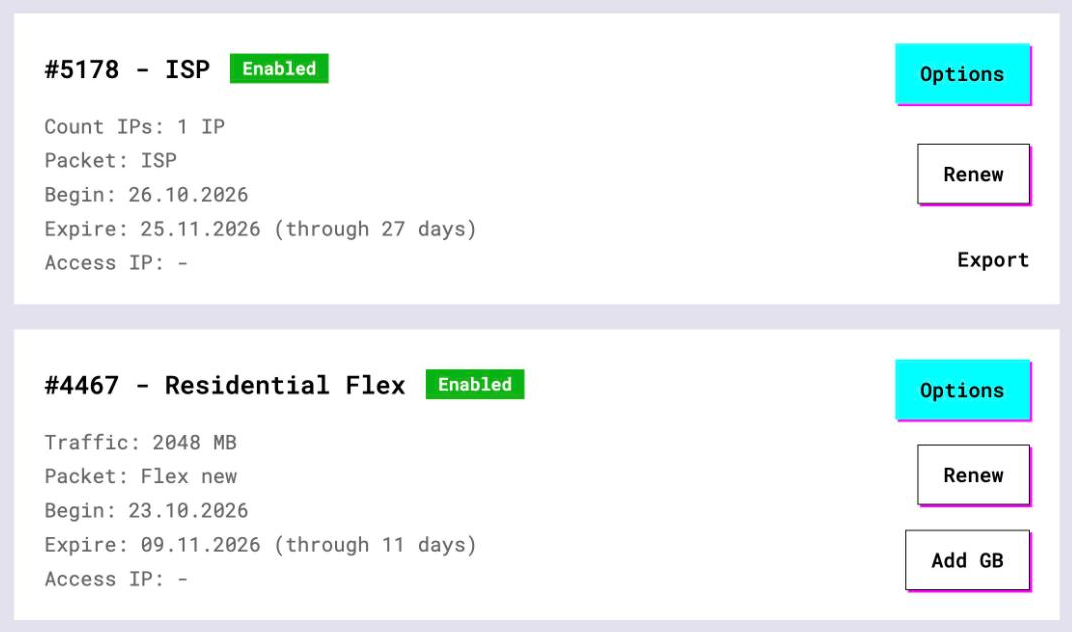
- Open the plan. For per-IP plans (ISP, datacenter) the IP list, port, login and password are on the card, and Export gives you the whole list as text
- Note the exit IP. On a static plan it is the host you connect to, and it is the address SendGrid will see
Residential plans build their login string under Options and rotate the exit. Fine for a quick look at a landing page, wrong for an allowlist.
3 Put the static IP on the allowlist
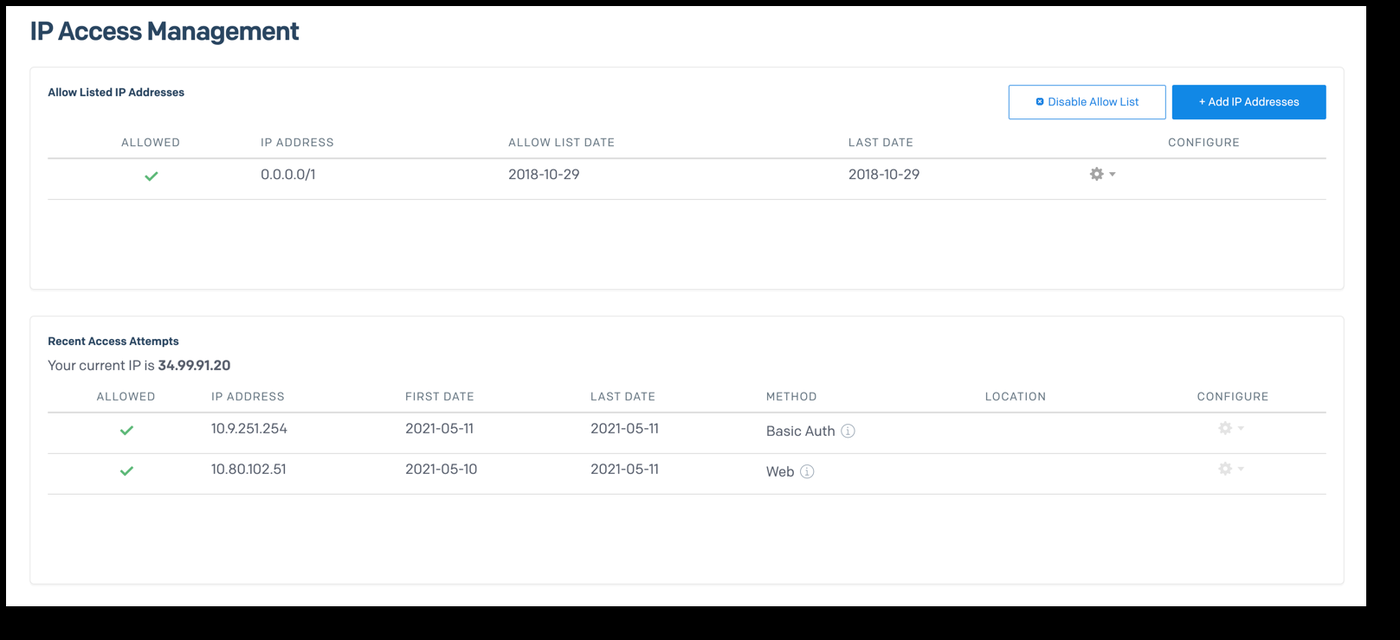
Do this from a browser that already goes through the proxy. Then your current address shows up in Recent Access Attempts and you add it with one click instead of typing.
- Open Settings, then IP Access Management
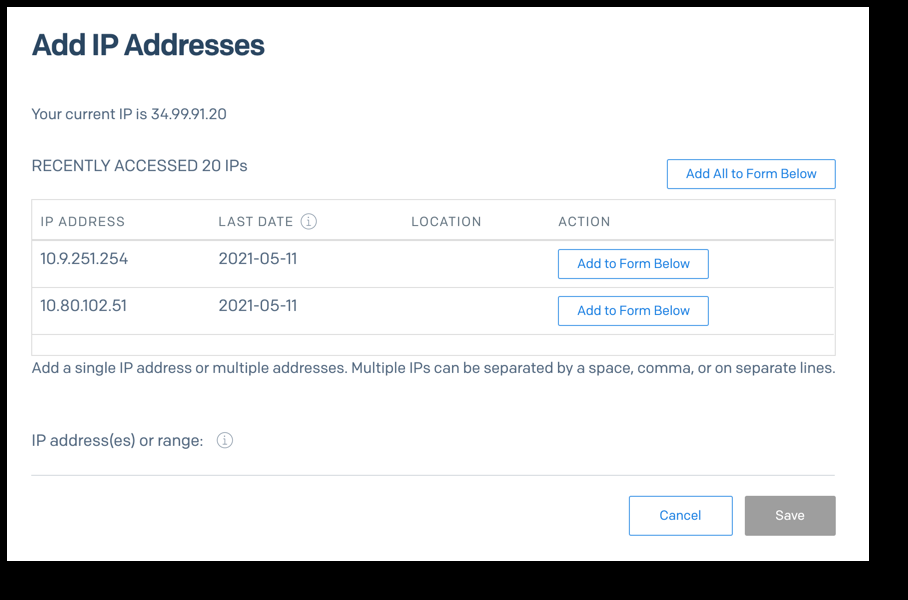
- Click Add IP Addresses. Tick the two acknowledgement boxes and click Confirm and Continue
- In Recent Access Attempts press + next to the GeekProxy IP, or use Add all to form below. Typing works too: Manually add IPs, then the field IP addresses or ranges to add. CIDR ranges are accepted, separated by a comma, a space or a line break
- Click Add # IPs, then Save
The list holds up to 1,000 addresses. The table is called Allow Listed IP Addresses, and the same page has Disable Allow List, Remove From Allow List and Remove IP. Treat that last one with respect.
Remove your own IP and you "block your access to your account". Twilio restores it only after thorough proof of identity and ownership. This is why a rotating or sticky-with-expiry proxy has no business on this page: the day the exit changes, you are the one locked out.
4 API and SMTP relay through the proxy
The v3 API lives at https://api.sendgrid.com/v3 and wants Authorization: Bearer <YOUR_API_KEY_HERE>. A profile read is the cheapest test call:
curl -x http://LOGIN:PASSWORD@IP:PORT \
     -H "Authorization: Bearer $SENDGRID_API_KEY" \
     https://api.sendgrid.com/v3/user/profile
curl accepts http://, https://, socks4://, socks4a://, socks5:// and socks5h:// after -x. Credentials can also go in -U LOGIN:PASSWORD if the password has characters a URL dislikes.
Python requests
import os, requests

PROXY = "http://LOGIN:PASSWORD@IP:PORT"
proxies = {"http": PROXY, "https": PROXY}
headers = {"Authorization": f"Bearer {os.environ['SENDGRID_API_KEY']}"}

r = requests.get("https://api.sendgrid.com/v3/user/profile",
                 headers=headers, proxies=proxies, timeout=(5, 30))
print(r.status_code, r.text[:200])
The official sendgrid-python SDK
Here the transport is different and it matters. sendgrid-python depends on python-http-client, which uses urllib.request and builds its opener with build_opener(). Python's docs: a ProxyHandler is added when proxy settings are detected, and its default is to read <protocol>_proxy from the environment. So an exported https_proxy is all the SDK needs. The flip side: urllib has no SOCKS support, so this has to be an HTTP proxy.
export https_proxy="http://LOGIN:PASSWORD@IP:PORT"
python3 send_hello.py
# send_hello.py, the SDK's own Hello Email flow
import os, sendgrid

sg = sendgrid.SendGridAPIClient(api_key=os.environ["SENDGRID_API_KEY"])
# mail = the Mail object built exactly as in the SDK README
response = sg.client.mail.send.post(request_body=mail.get())
print(response.status_code)      # 202 when accepted
SMTP relay
Some apps cannot speak REST and submit through smtp.sendgrid.net instead. Username is the literal string apikey, password is the key. Twilio lists ports 25, 2525 and 587 for plain or TLS, 465 for SSL, and recommends TLS on 587. To push that submission through a proxy, the proxy has to carry mail ports. Among GeekProxy products mail ports are available on Residential Turbo, ask support for details. Residential Flex documents 25, 465 and 587 as closed, so it cannot relay to SendGrid at all.
5 Several client accounts, separate profiles
Inside one SendGrid account the official tool is Subusers: up to 15, more by support ticket, on the Pro or Premier API plan and the Advanced Marketing Campaigns plan. Twilio frames them as separating transactional from marketing traffic. Subusers need no separate IPs.
The separate-IP case is different accounts with different billing, each with its own IP Access Management list. Give every client a browser profile and a GeekProxy static IP of its own, and put that IP on that client's allowlist. Then the session is consistent and the lockout rule stays satisfied.
- Firefox stores proxy settings per profile, including SOCKS with remote DNS. One profile per client is the shortest path
- Chrome uses the OS proxy unless started with
--proxy-server="http://IP:PORT"and a separate user data directory - SOCKS5 with login and password does not work in Chromium browsers or Firefox. Chrome's own docs say it supports no SOCKS5 auth. Use HTTP with login:password, or SOCKS5 with IP whitelist auth in your GeekProxy plan
- Turn on two-factor auth per account under Settings, Two-Factor Authentication, by SMS or an authenticator app. Once it is on, API calls must use an API key, not Basic auth
6 Verify it works
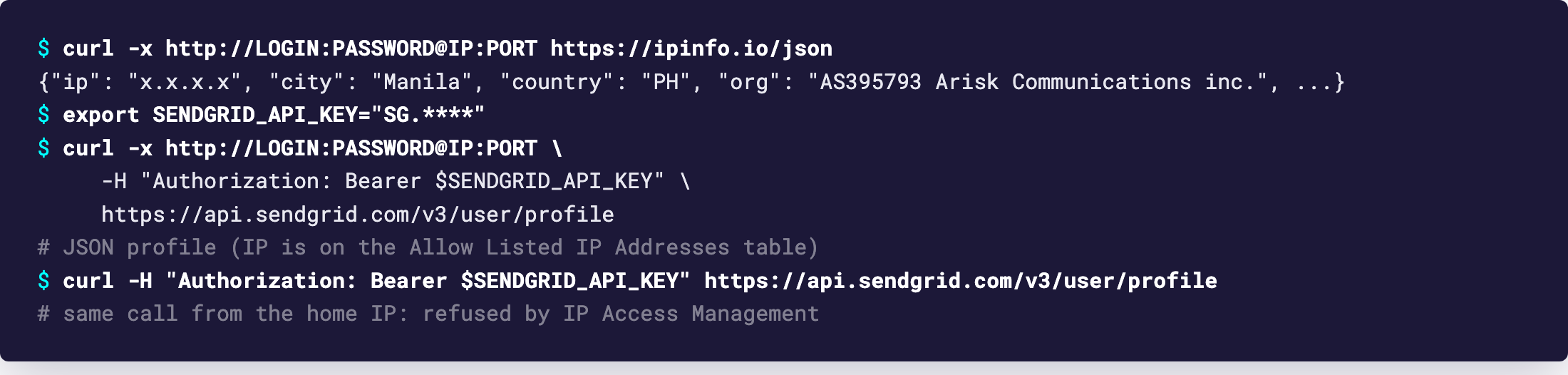
Start with curl -x http://LOGIN:PASSWORD@IP:PORT https://ipinfo.io/json. The IP in the answer must match the entry in Allow Listed IP Addresses. Then run the profile call from section 4 through the proxy, expect 200 and JSON.
Third check, the one that proves the allowlist is live: run the profile call without -x. It should be refused. Keep the proxy session open in another tab while you test, so a mistake never leaves you without a way back in.
7 Which GeekProxy product fits
IP Access Management is a static-IP feature by Twilio's own warning, so the API and console scenarios belong on ISP static or dedicated datacenter IPv4, one fixed address per account and no traffic meter on JSON. Residential Turbo is the pick only for the SMTP relay case, because mail ports are available there (ask support for details). Residential Flex closes the submission ports, and mobile has no documented advantage with SendGrid.
8 Common issues
Locked out right after enabling the allowlist
The IP you added is not the IP you browse from, or the exit rotated. Twilio's doc says exactly this will happen with a non-static IP. Recovery goes through their identity check, so prevent it: add the GeekProxy static IP from Recent Access Attempts while browsing through it.
API calls refused with the key that worked yesterday
Same cause from the script side. Compare https://ipinfo.io/json through the proxy with the allowlist entry. A sticky residential session expired and moved.
sendgrid-python ignores my SOCKS proxy
urllib does not speak SOCKS. Set https_proxy to an http:// URL. GeekProxy ISP and datacenter plans serve HTTP on the same port.
Basic auth stopped working
Two-factor auth is on. SendGrid then requires an API key for API calls. Generate one and use the Bearer header.
Account under review
Stages are Warned, Suspended (mail held up to 72 hours), Deactivated and Banned, triggered by what Twilio calls apparent abnormal activity. Login IP changes are not on that list. Sending reputation is, so fix the list quality rather than the network.
Get a static IP for SendGrid
ISP and datacenter addresses that never rotate, HTTP and SOCKS5, ready in seconds.
Place an order