
Set up GeekProxy with Voluum
Voluum is a cloud tracker and has no proxy setting. Clicks hit Voluum's servers and get redirected; your proxy is never on that path. Where a proxy does belong is in the browser you test with. Voluum's own Testing Guide says so. If you advertise in a country other than the one you sit in, use a VPN, so that you appear to connect to the lander from inside the targeted country. A GeekProxy exit in the browser does the same job with the country picked per session. This guide covers that, plus the Proxy report and rule that judge your test click.
You'll need: an active GeekProxy plan, the proxy credentials from your dashboard, and a Voluum campaign with a lander or offer. About ten minutes.
Get proxies1 Before you start
Search the Voluum docs for "proxy" and you get three things, none of them a settings dialog.
- A Proxy condition for rule-based paths. The pricing page describes it as filtering out traffic that uses various types of proxy solutions, and notes that some conditions depend on your plan
- A Proxy grouping in reports, under the Connection drop-down, available on all plans. It classes each visit as Anonymous, Transparent, Hosting, Corporate, Public, Edu, or "?" for not determined to be a proxy
- An Anti-Fraud Kit metric called Data centers, which flags IPs of known data centers. The docs note that VPN users are often routed through data centers, so such visits are more likely invalid
All three look at the visitor's IP. Your test click is a visitor. So the exit you pick in the browser decides whether Voluum files you under "?" like a normal person, or under Hosting like a bot farm. That is the whole trick, and it is not much of one.
What you'll need
- Active GeekProxy plan (residential or ISP; section 7 explains why not datacenter)
- Proxy credentials from your dashboard: Host, Port, Username, Password
- Chrome or Firefox, or an anti-detect profile
- A Voluum campaign with its campaign URL, a lander and an offer
- Field Where it comes from
- Protocol HTTP (SOCKS5 only with IP whitelist)
- Host IP or gateway hostname from the dashboard
- Port from the dashboard
- Username from the dashboard
- Password from the dashboard
2 Where to get your credentials
- Log in to your GeekProxy dashboard
- Open the plan. For per-IP plans (ISP, datacenter) the IP list, ports, login and password sit right on the card, and Export hands you the whole list as text
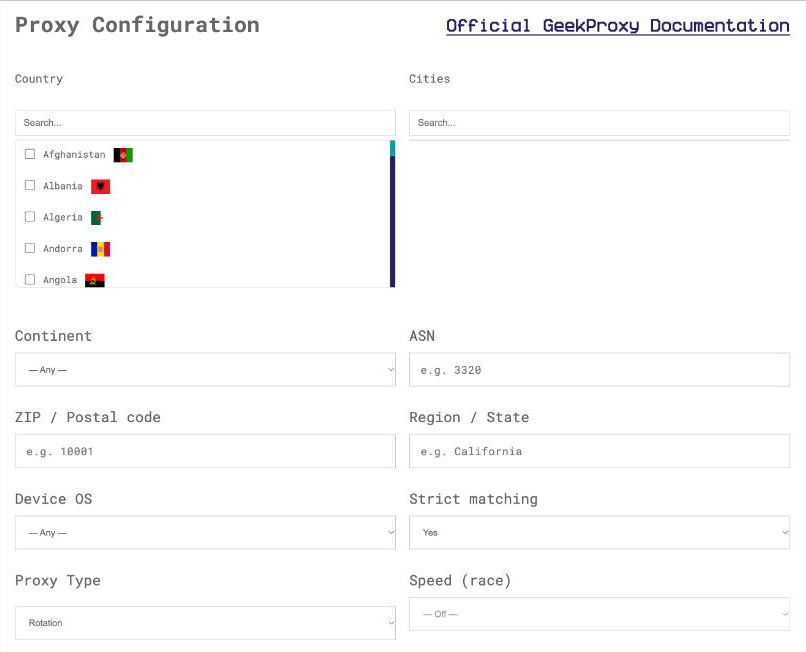
- For residential plans click Options. The Proxy Configuration panel builds the login string with your country, city and session settings. Copy the finished line from the Proxy List
Pick the country of the offer. If your Voluum rules use City or Region (both are Advanced rules), pick the city too, or the test will route past the branch you wanted to see.
3 Put a browser behind the proxy
The browser part is the same for every tracker, so we keep it short here and detailed in the Google Chrome and Firefox guides. Host IP, port PORT as an HTTP proxy. The browser asks for LOGIN and PASSWORD on the first page.
Two Voluum-specific habits from the Testing Guide. Open the campaign URL in an incognito window, so no cookie from an earlier visit changes the path. And use the same tracking domain throughout the whole funnel: campaign URL, lander click URL, postback. Mixing domains breaks click tracking in ways that look like a proxy problem and are not.
SOCKS5 with a login and password does not work in Chrome, Edge, Opera or Firefox. Use HTTP with login and password, or switch the GeekProxy plan to IP whitelist and use SOCKS5 without auth.
4 Walk the funnel in Test mode
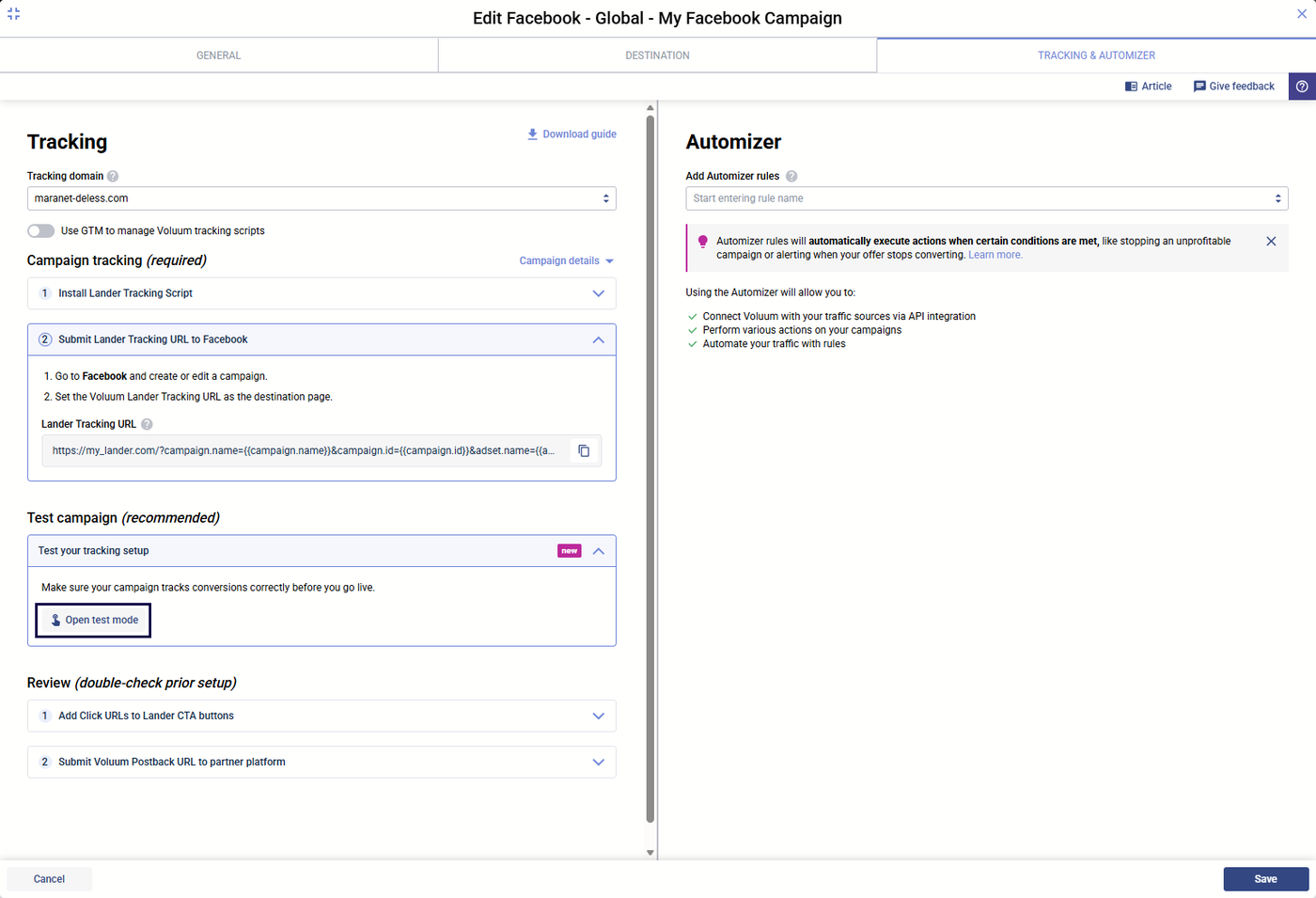
Since the March 2026 update Voluum has a test mode in the campaign creation form. Turn it on, follow the on-screen instructions, and all test visits and conversions stay out of your reports. Before that update every test click sat in your stats forever. Use it.
- Open the campaign in Voluum and switch on test mode in the campaign form
- Copy the campaign URL, paste it into the incognito window of the proxied browser
- Follow the chain: campaign URL, lander, click-through, offer. Check language, currency and price for the geo you are pretending to be in
- Fire a test conversion if the offer allows it, so the postback path is covered too
The Testing Guide adds one caveat worth repeating: page load time will be shorter for visitors who are really in the targeted country. Your proxied visit says nothing about speed.
5 Read the Proxy report and rules
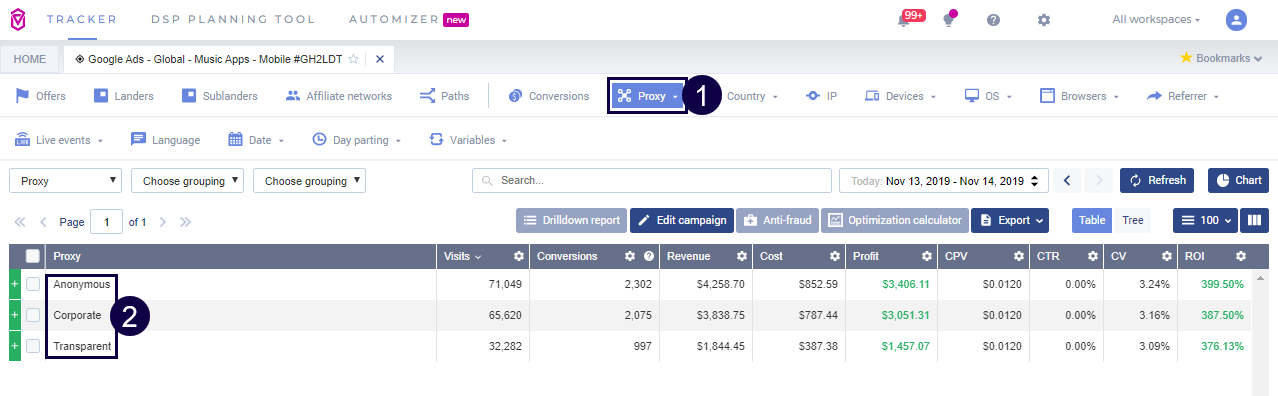
Now find out what Voluum made of your visit. In a report, select Proxy from the Connection drop-down. Your test click shows up in one row. Here is how to read the labels, straight from the Sample Report page.
- Hosting: the IP belongs to a hosting facility and is likely a proxy. This is what a datacenter exit gets
- Anonymous: the IP address is not available. Transparent: available but may not be reliable
- Corporate, Public, Edu: shared central IPs of a company, a public network, a university
- ?: not determined to be a proxy. This is where a residential or ISP exit lands, and where your real visitors land
Rule-based paths
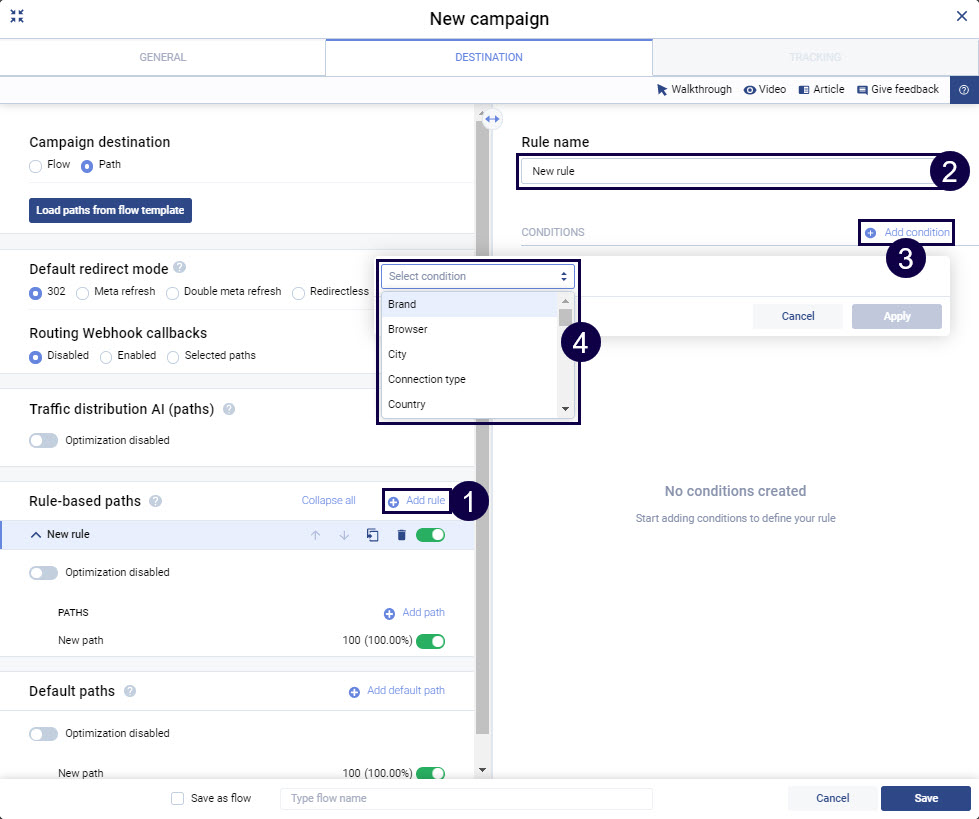
The same classification drives routing. In the campaign or flow form, click Add rule in the Rule-based paths section, then Add condition. Pick a condition from the drop-down, choose Is or Is not, and Apply. The conditions are grouped under tabs by topic. A Proxy rule that sends proxy traffic to a safe page will catch a Hosting-class test click. You will stare at the safe page thinking the lander is broken. Nothing is broken. The tracker did what you asked.
Connection type, by the way, comes from the Digital Element database and knows Dialup, Mobile, Satellite, Unknown, Wifi and Wired. A rule on Connection type = Mobile needs a mobile exit to test; a Wi-Fi laptop behind a residential proxy will not get there.
Traffic filtering by IP and user agent lives under Advanced, Traffic filtering: up to 50 rules of 50 lines, redirect tracking required, no IPv6. An office IP listed there does nothing to the proxied browser, which arrives from a different address.
6 Verify it works
- In the proxied incognito window open
https://ipinfo.io/json. It must show the proxy IP - Open the campaign URL with test mode on and walk to the offer
- In Voluum, group a report by Connection, Proxy. Your click should sit in the "?" row, with the country of the exit you chose
- If the Anti-Fraud Kit is on your plan, the Data centers metric for that visit should stay at zero
Repeat per geo. Every country you buy traffic for gets its own exit and its own walk-through.
7 Which GeekProxy product fits
Residential Flex or ISP static for everything visitor-side. Both come from consumer networks, which is why Voluum files them under "?" instead of Hosting and why the Data centers metric ignores them. Flex is TCP only, which no browser notices, and lets you pick the country and city per session. That matters when an offer is state-targeted and your Advanced rules use Region or City. ISP static is the pick when you want the same address for weeks. Mobile is the only way to test a Connection type = Mobile branch or a carrier-targeted offer. Datacenter IPv4 is classed Hosting and counted as data-center traffic, so keep it away from visitor-side tests.
8 Common issues
My test click shows Proxy = Hosting
The exit is a datacenter address. Switch the browser to a residential or ISP exit and click again. The label is decided by the IP, not by anything in Voluum.
I land on the safe page instead of the lander
A rule-based path caught the click: Proxy, Country, Connection type or ISP. Check the Proxy row first, then the country of your exit against the rule.
Test clicks are polluting my reports
Test mode was off. Switch it on in the campaign form before the next round. Earlier clicks stay where they are.
The browser never asks for the proxy password
You chose SOCKS5. Chrome and Firefox do not send SOCKS5 credentials. Use HTTP with login and password, or an IP-whitelisted plan.
Lander opens but the offer blocks me
The offer owner runs their own geo and proxy checks, separate from Voluum. Make sure the exit country matches the offer's allowed geo, and try an ISP static address, which looks like a plain home connection to most such checks.
Get proxies for Voluum checks
Residential, ISP and mobile exits in the geos you run, HTTP and SOCKS5, ready in seconds.
Place an order