
Set up GeekProxy in Microsoft Edge
Edge takes its proxy from the operating system by default, so the everyday route is the Windows or macOS proxy dialog. Edge also documents command-line switches and a policy, which is how you run several Edge windows on different GeekProxy IPs at once. This guide covers all three.
You'll need: an active GeekProxy plan and the proxy credentials from your dashboard. The OS route takes five minutes, the command line about one.
Get proxies1 Before you start
Microsoft's own words: the Edge network stack uses the system network settings by default, proxy included. Edge profiles share that proxy. There is no proxy list inside the browser and no checker. What Edge adds on top of plain Chromium behaviour is good documentation of the switches and a policy for managed machines.
Three ways to point Edge at a proxy, in order of precedence:
- The ProxySettings policy. When it's set, Edge ignores every proxy switch on the command line
- Command-line switches like
--proxy-server. They apply to that one launch and beat the system setting - The operating system dialog. Applies to Edge and to every other app that follows system settings
Authentication rules come from Chromium and bite the same way as in Chrome. HTTP and HTTPS proxies with login and password work through a sign-in prompt. SOCKS5 with login and password does not work at all, and credentials written into the proxy string are ignored. For SOCKS5 you need the IP whitelist mode of your GeekProxy plan.
What you'll need
- Active GeekProxy plan (ISP, datacenter or residential)
- Proxy credentials from your dashboard: Host, Port, Username, Password
- Edge on Windows, macOS or Linux. The policy also exists on Android, iOS is out
- FieldWhere it comes from
- ProtocolHTTP (SOCKS5 only with IP whitelist)
- HostIP or gateway hostname from the dashboard
- Portfrom the dashboard
- Usernamefrom the dashboard
- Passwordfrom the dashboard
2 Where to get your credentials
- Log in to your GeekProxy dashboard
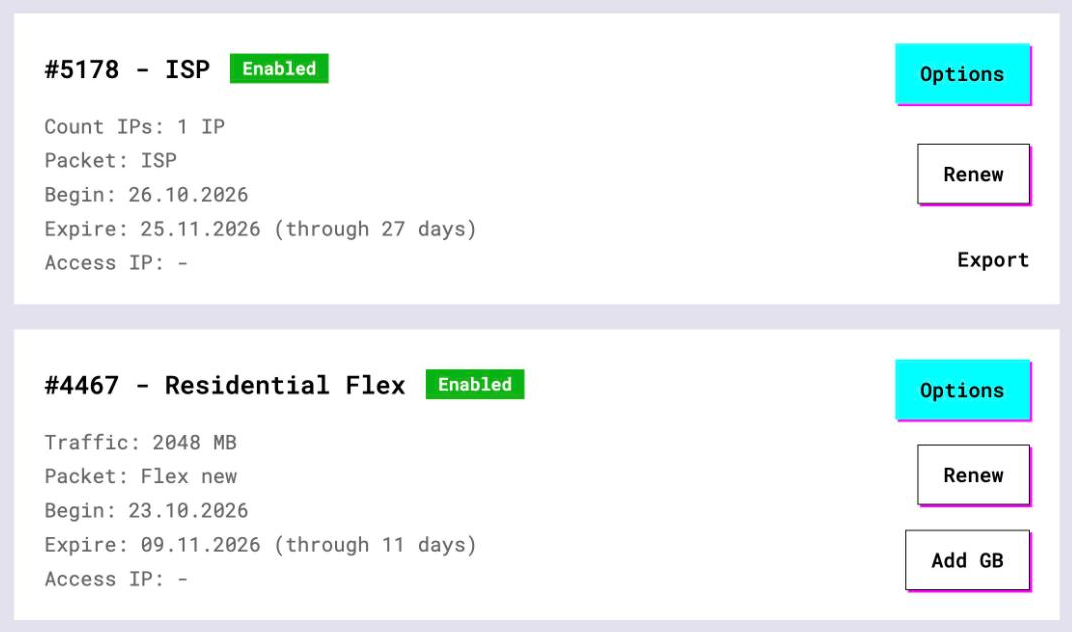
- Open the plan. For per-IP plans (ISP, datacenter) the address, port, login and password are on the card, and Export gives you the whole list as text. One line per Edge instance is the plan here
- For residential plans click Options. The Proxy Configuration panel builds a login string with your country and a sticky session. Copy host, port and the login from the Proxy List
3 The system proxy route
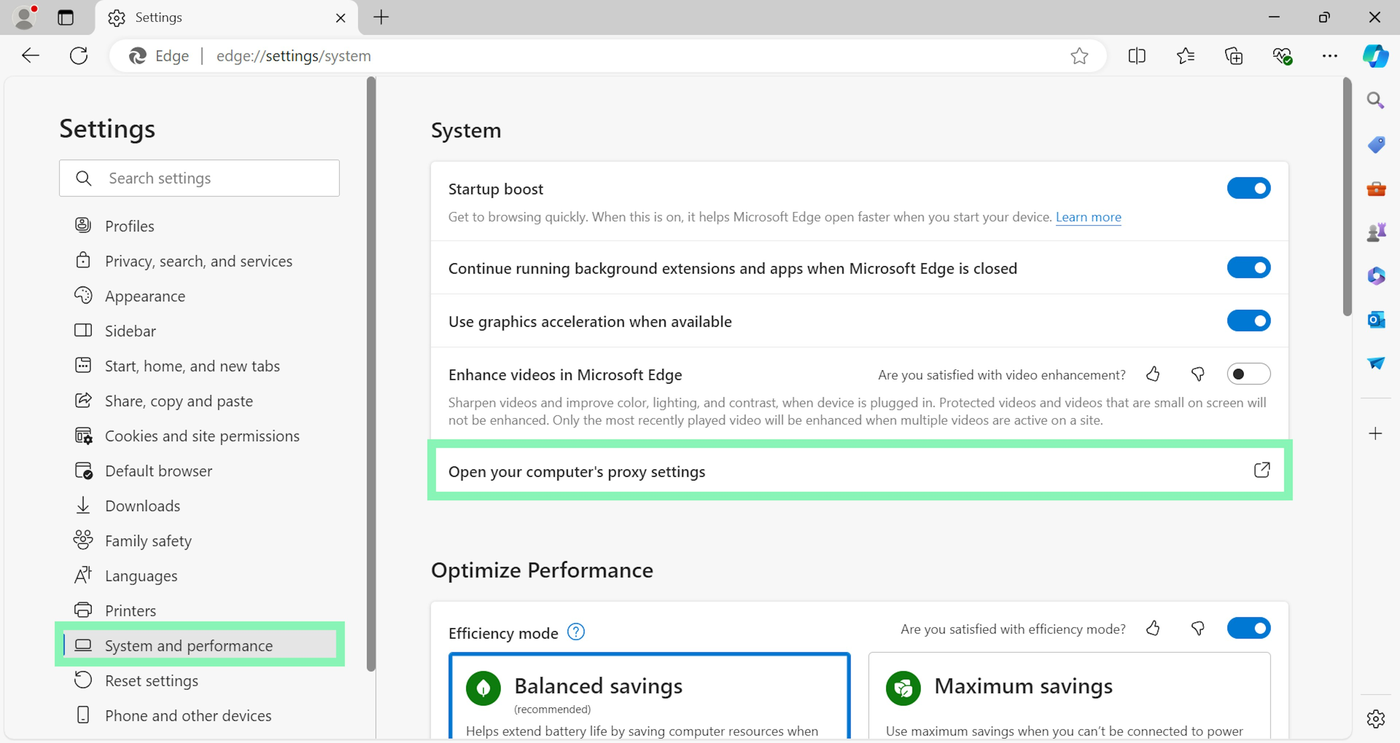
Inside Edge's Settings there is only a shortcut that opens your computer's proxy settings. Nothing proxy-related is stored in Edge itself. You can click that shortcut or go straight to the OS. Same destination.
The dialogs are the ones from our Google Chrome guide, with screenshots. In brief:
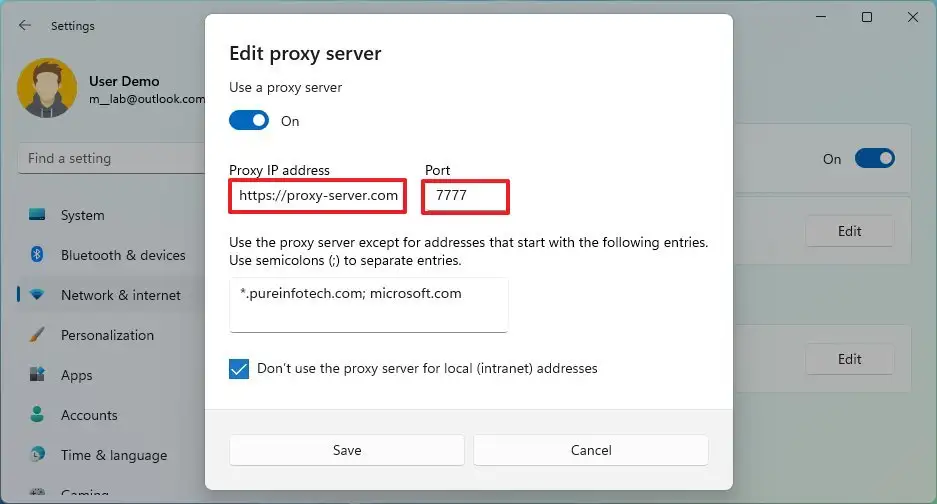
- Windows: Settings > Network & internet > Proxy. Under Manual proxy setup click Set up next to Use a proxy server. Turn it on, enter the proxy IP in Proxy IP address and the port in Port, press Save
- macOS: System Settings > Network, the active connection, Details, the Proxies tab. Fill the HTTP and HTTPS rows with the same host and port
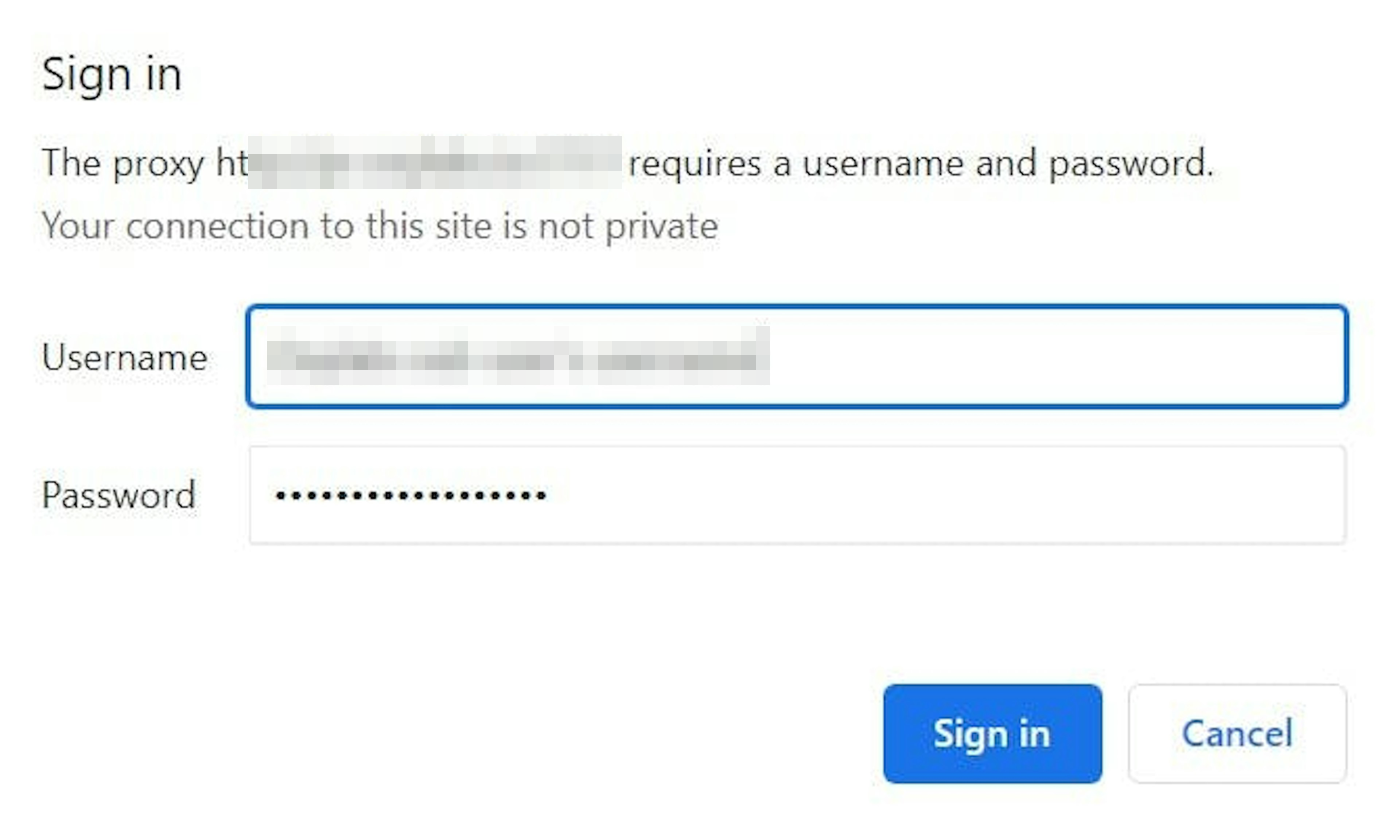
Open a page in Edge afterwards. The proxy asks for credentials, Edge shows a sign-in prompt, you type the login and password. Plans in IP whitelist mode skip the prompt.
4 Command-line switches
This is the interesting part of Edge. Microsoft Learn documents five switches, verbatim:
--proxy-server=<scheme>=<uri>[:<port>][;...] | <uri>[:<port>] | "direct://"sets the proxy for this launch--proxy-bypass-list=(<trailing_domain>|<ip-address>)[:<port>][;...]lists hosts that skip the proxy. Must be used together with--proxy-server--no-proxy-servertells Edge to use no proxy even if the system has one--proxy-auto-detectand--proxy-pac-url=<pac-file-url>for auto-config setups
Microsoft's own examples are --proxy-server="http=proxy1:8080;ftp=ftpproxy", a plain --proxy-server="proxy2:8080", and a fallback chain --proxy-server="http://proxy2:8080,direct://". The scheme prefixes https://, socks5:// and socks4:// come from Chromium and work the same way. A proxy without a scheme is treated as HTTP.
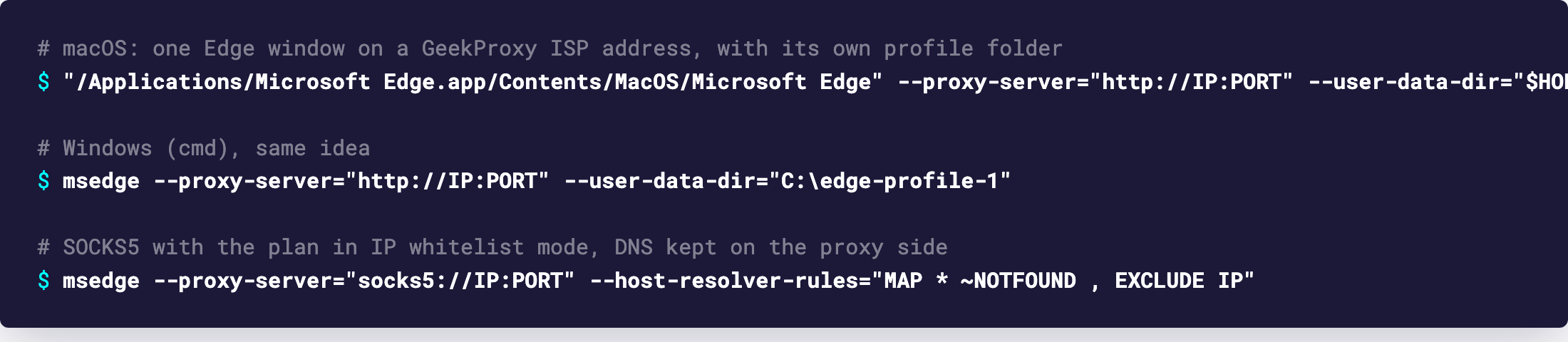
With a GeekProxy ISP address it looks like this. Add --user-data-dir and every launch gets its own cookies and its own IP, which is the cheapest multi-account setup there is.
# Windows
msedge --proxy-server="http://IP:PORT" --user-data-dir="C:\edge-profile-1"

# macOS
"/Applications/Microsoft Edge.app/Contents/MacOS/Microsoft Edge" \
  --proxy-server="http://IP:PORT" --user-data-dir="$HOME/edge-profile-1"

# SOCKS5 (plan in IP whitelist mode), plus the DNS catch-all from the Chromium docs
msedge --proxy-server="socks5://IP:PORT" \
  --host-resolver-rules="MAP * ~NOTFOUND , EXCLUDE IP"
Why the last line? Chromium resolves names on the proxy side for SOCKS5, but its DNS prefetcher may still look names up locally. The Chromium network docs recommend that --host-resolver-rules value as a catch-all that stops Edge from sending any DNS over your own connection.
No login goes into the switch. Edge ignores credentials in the proxy string, so the first page load brings the same sign-in prompt as in the OS route. Type the login and password there.
Bypass matching is loose: Microsoft notes that *microsoft.com in the bypass list also matches imicrosoft.com. Keep the list short and specific, or a wildcard will route more than you planned around the proxy.
5 The ProxySettings policy
For a machine where the proxy must survive restarts and users, Edge has the ProxySettings policy. It's a JSON string with ProxyMode (direct, system, auto_detect, fixed_servers, pac_script), ProxyServer, ProxyBypassList, ProxyPacUrl and ProxyPacMandatory. Microsoft lists it as per-profile capable.
{"ProxyMode": "fixed_servers", "ProxyServer": "IP:PORT", "ProxyBypassList": "localhost"}
On Windows the value lives in the registry at SOFTWARE\Policies\Microsoft\Edge, name ProxySettings, type REG_SZ. On macOS it's the ProxySettings key in Edge's managed plist. Once the policy is present, command-line switches are ignored. That's by design and it trips people who test with --proxy-server on a managed laptop.
6 Verify it works
Open https://ipinfo.io/json in the Edge window you configured. The ip field must show the proxy address, not your own. On an ISP or datacenter plan that is the address from your dashboard, on Residential or Turbo it is an address from the pool in the country you picked. The country and org fields describe the proxy network. Open the same page in a second window started with a different --proxy-server and a different folder, and you should see a second IP.
If you set the policy, edge://policy lists ProxySettings with its value and tells you whether Edge accepted it.
7 Which GeekProxy product fits
One Edge through the system dialog is one identity, so take a static IP: ISP static when the accounts should look like a home connection, datacenter IPv4 when price matters more. For the scripted setup with --proxy-server and a folder per instance, give each instance its own ISP address, or one Residential Turbo sticky session string per instance. Turbo holds the session for up to 1440 minutes and offers HTTP and SOCKS5. HTTP with login and password is the protocol to pick in Edge. SOCKS5 only if the plan is in whitelist mode.
8 Common issues
--proxy-server does nothing
A ProxySettings policy is active, and Microsoft says Edge then ignores all proxy switches. Check edge://policy. If the policy isn't yours, the machine is managed and you'll need the administrator.
SOCKS5 with login and password fails on every page
Chromium has no SOCKS5 authentication. Switch the GeekProxy plan to IP whitelist, or use the HTTP port with the sign-in prompt.
The sign-in prompt keeps coming back
A typo in the login, or the plan is in IP whitelist mode and your current address isn't on the list. Compare with the dashboard. Home IPs change after a router reboot, which is the usual cause.
Some sites still see my real country
WebRTC and other UDP traffic don't travel through HTTP or SOCKS proxies in Chromium. With SOCKS5 there is also the DNS prefetch detail. Add the --host-resolver-rules value from section 4 and deal with WebRTC separately.
Proxy settings are locked on this computer
It's a managed device, and the policy wins over everything else. Only the administrator can change it.
Get proxies for Microsoft Edge
Static ISP and datacenter IPs, or sticky residential sessions, one per Edge instance.
Place an order