
Set up GeekProxy in Postman and Insomnia
Both API clients have a proper proxy screen, and both apply it to the whole app rather than to one collection. This guide walks through Postman's Settings, Newman for the same collections on the command line, and Insomnia's Preferences. Exact labels included, plus the one SOCKS limit that matters.
You'll need: an active GeekProxy plan and the proxy credentials from your dashboard. Setup takes about three minutes per app.
Get proxies1 Before you start
Postman and Insomnia are desktop apps for Windows, macOS and Linux, both with a free tier, and both put the proxy in global settings. There is no per-collection or per-request proxy in either; the setting applies to every request the app sends. Insomnia goes further and routes all of its traffic, sync and login included, through the same proxy. The Postman web app cannot configure the default proxy at all, so this guide is about the desktop app.
SOCKS5 with a login and password, the honest version:
- Postman lists HTTP, SOCKS5, SOCKS5H, SOCKS4 and SOCKS4A in its protocol dropdown, but its "Proxy auth" toggle is described as basic authentication. Whether those credentials reach a SOCKS5 proxy is something we could not confirm. HTTP with "Proxy auth" is the verified path
- Insomnia accepts
socks4://,socks4a://,socks5://andsocks5h://prefixes, depending on version, and ties credentials to Basic, Digest and NTLM, which are HTTP mechanisms. SOCKS5 with credentials: not verified. Usehttp://LOGIN:PASSWORD@IP:PORT - Newman: SOCKS only in library mode through a custom agent; the CLI itself reads HTTP proxy variables
An IP whitelist on the plan removes the question. Both apps then take a bare host and port.
What you'll need
- Active GeekProxy plan (ISP, datacenter or residential)
- Proxy credentials from your dashboard: Host, Port, Username, Password
- Postman desktop app, Insomnia 10.1 or newer, Node.js for Newman
- Field Where it comes from
- Protocol HTTP (SOCKS5 with IP whitelist)
- Host IP or gateway hostname from the dashboard
- Port from the dashboard
- Username from the dashboard
- Password from the dashboard
2 Where to get your credentials
- Log in to your GeekProxy dashboard
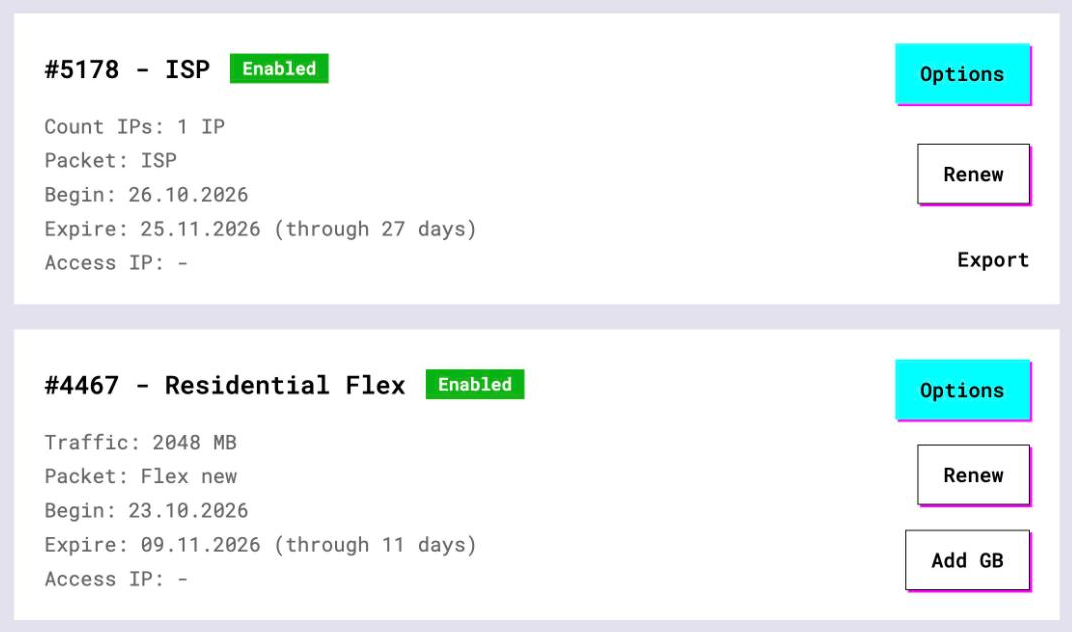
- Open the plan. For per-IP plans (datacenter, ISP) the IP list, ports, login and password sit right on the card, and Export hands you the whole list as text
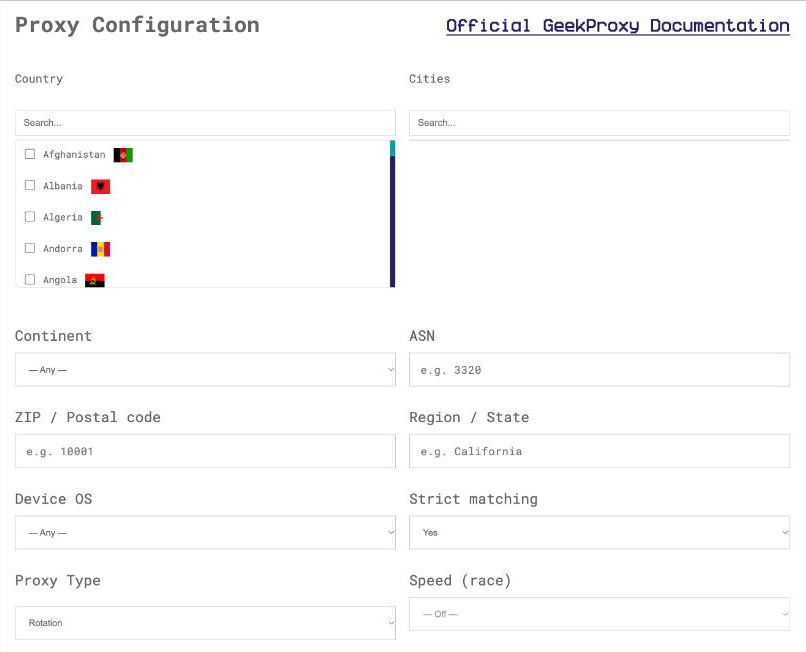
- For residential and mobile plans click Options. The Proxy Configuration panel builds the login string with your country, city and session settings. Copy the finished line from the Proxy List
Postman wants the four values in four separate fields, Insomnia wants one URL. Keep both forms handy. For a geo check across countries, build a Turbo login with the country and a session_id in the dashboard, so that a whole collection run comes from one address.
3 Postman desktop: Settings, Proxy
Click the Settings icon in the header, choose Settings and open the Proxy tab. The page has two blocks, and only the second one is about your requests.
"Default proxy configuration" is the system proxy the app uses to reach the internet. If that proxy needs Basic auth, tick "This proxy requires authentication", fill "Username" and "Password" and press "Save and Restart Postman". Leave it alone for GeekProxy unless your whole OS already goes through a proxy.
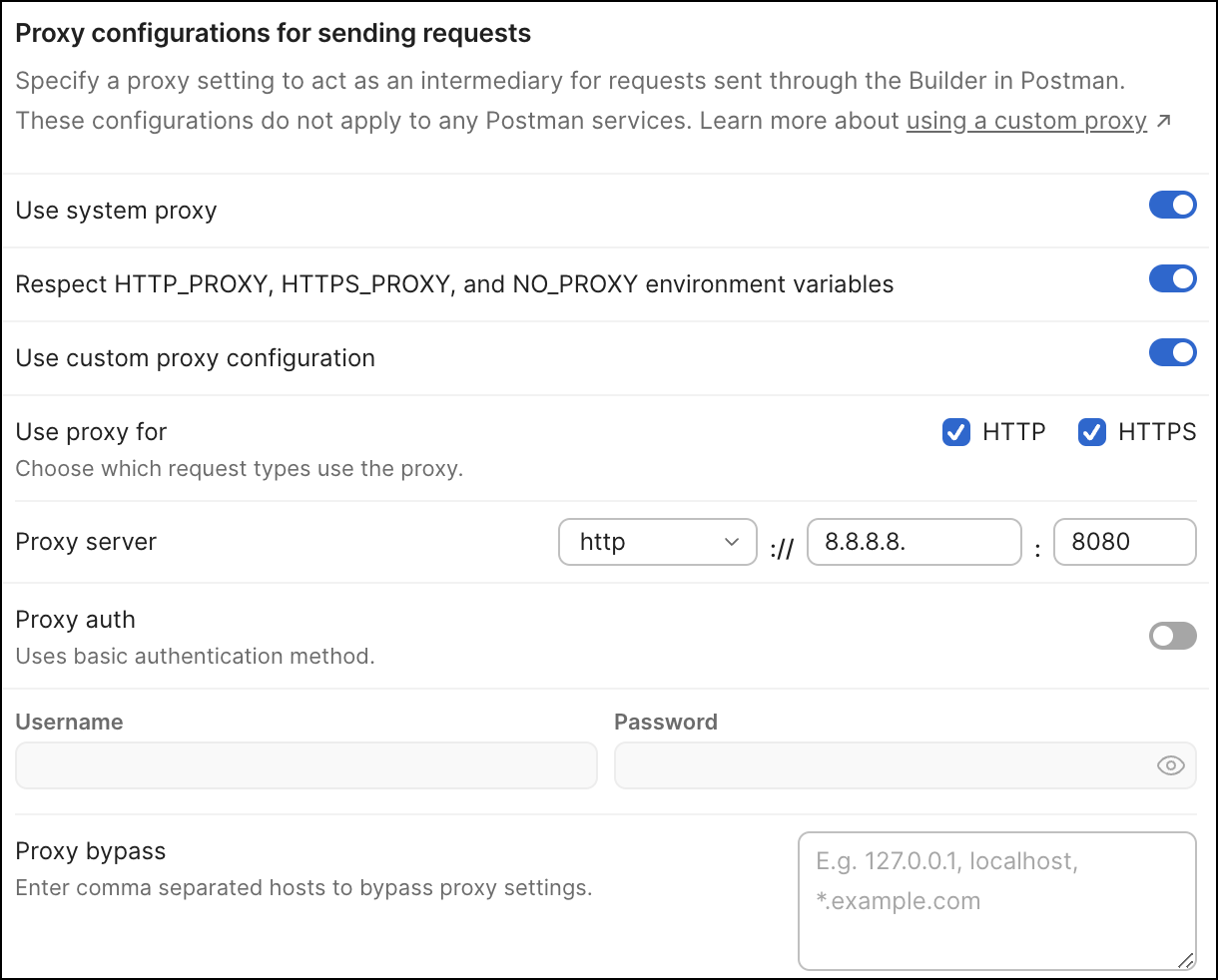
"Proxy configurations for sending requests" is the block you want. It has a "Use system proxy" toggle, with an optional second toggle that reads the HTTP_PROXY, HTTPS_PROXY and NO_PROXY variables from the OS, and a "Use custom proxy configuration" toggle. Turn the custom one on; if both are on, Postman uses the custom proxy. Then:
- "Use proxy for": keep both HTTP and HTTPS ticked, which is the default
- "Proxy server": pick HTTP in the protocol dropdown, type
IPin the hostname field andPORTin the port field. The page says it twice: do not include the protocol in the hostname field - Switch on "Proxy auth" and enter
LOGINandPASSWORD - "Proxy bypass": a comma-separated list of hosts that skip the custom proxy, for example your local services
The settings apply to requests Postman sends and to online resources it accesses. The capture proxy, where Postman acts as a proxy for your phone or browser, is a separate feature and not involved.
Proxy variables set at the OS level win. If HTTP_PROXY or HTTPS_PROXY exist in your environment, Postman uses the system proxy and ignores its own settings. Remove the variables, or launch Postman from a shell where they are cleared.
4 Newman and the Postman CLI
Newman runs the same collections from a terminal, and its README has one proxy section: environment variables. HTTP_PROXY or http_proxy, HTTPS_PROXY or https_proxy, and NO_PROXY or no_proxy. No flag exists; the options list has none.
export HTTPS_PROXY="http://LOGIN:PASSWORD@IP:PORT"
export HTTP_PROXY="http://LOGIN:PASSWORD@IP:PORT"
newman run collection.json
The README hands the details of those variables to the postman-request library, and we did not read that page. The scheme://user:pass@host:port form is the standard one in this ecosystem; if the login in the URL is not picked up, switch the plan to IP whitelist and use http://IP:PORT. Set NO_PROXY for anything that must stay local.

SOCKS in library mode
When Newman runs as a Node library, options.requestAgents takes custom agents for HTTP and HTTPS, and the README's example uses socks-proxy-agent. The README still shows the old default-export API with a { host, port } object; current socks-proxy-agent exports { SocksProxyAgent } and takes a URL.
const newman = require('newman');
const { SocksProxyAgent } = require('socks-proxy-agent');
const requestAgent = new SocksProxyAgent('socks5h://LOGIN:PASSWORD@IP:PORT');

newman.run({
    collection: require('./sample-collection.json'),
    requestAgents: {
        http: requestAgent,   // agent used for HTTP requests
        https: requestAgent,  // agent used for HTTPS requests
    }
}, function (err) {
    if (err) { throw err; }
    console.log('collection run complete!');
});
The Postman CLI, the newer postman binary, lists no proxy option on its options page. Whether it honours the environment variables we have not checked; use Newman when the run must go through a proxy.
5 Insomnia: Preferences, Proxy
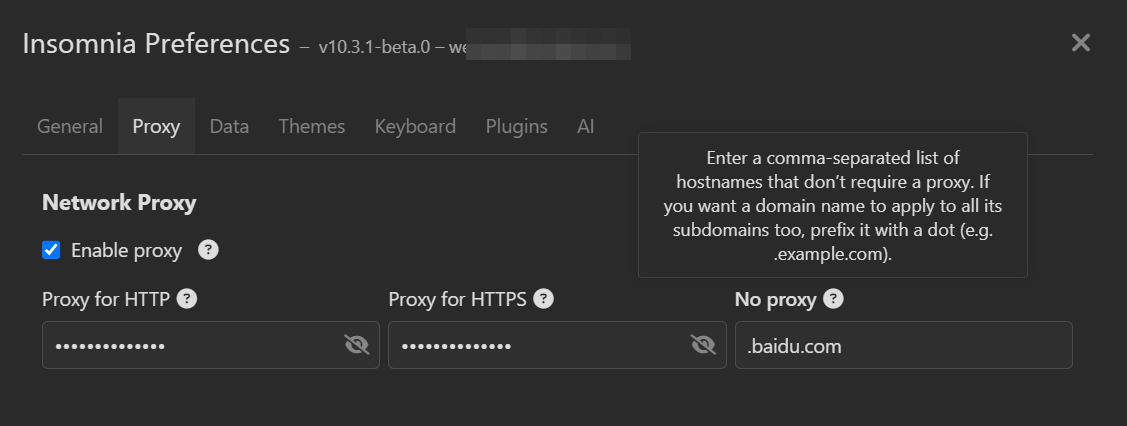
Open Preferences and go to Proxy. Since version 10.1 Insomnia picks up the operating system proxy on its own, and the same screen lets you override it. The HTTP and HTTPS proxies are entered as full URLs with a scheme prefix, and credentials go into the URL as Basic auth, the docs' example being http://username:password@localhost:8005. So for GeekProxy:
- HTTP proxy field:
http://LOGIN:PASSWORD@IP:PORT - HTTPS proxy field: the same value
- "No Proxy": comma-separated hostnames that bypass the proxy, such as localhost
Insomnia also supports Digest and NTLM proxy authentication, which GeekProxy does not need. One thing to keep in mind. The proxy applies to all traffic going through the application, and the docs say outright that it cannot be limited to specific collections or requests. Your sync and login traffic rides the same proxy.
6 Verify it works
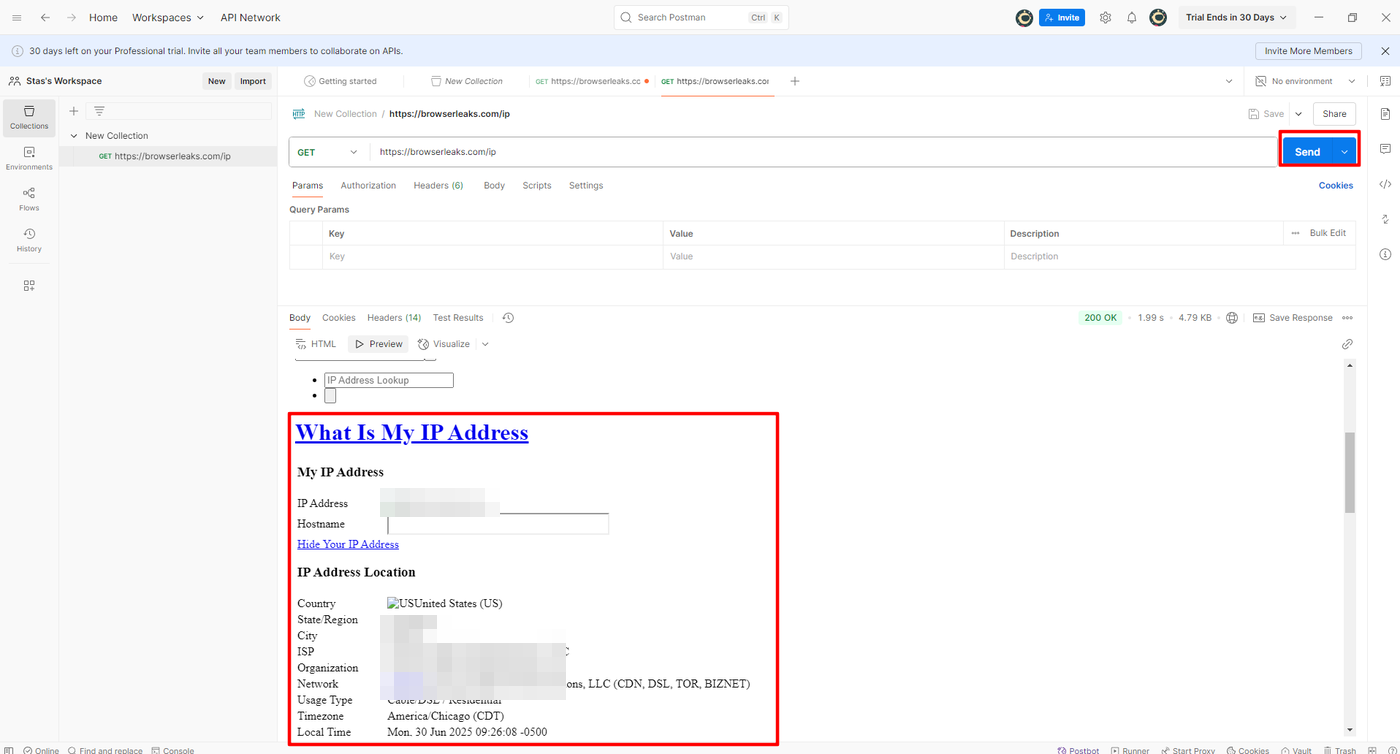
Create a GET request to https://ipinfo.io/json in either app and send it. The ip field must show the proxy address, not your own. On an ISP or datacenter plan that is the address from your dashboard, on Residential or Turbo it is an address from the pool in the country you picked. The country and org fields describe the proxy's network.
For Newman, add the same request to a throwaway collection and read the response in the run output. Your own IP back means the variables were not exported in the shell that runs Newman, or NO_PROXY matched more than you meant.
7 Which GeekProxy product fits
A developer testing an API from a fixed address, or from a country the API treats differently, wants one IP that never changes: ISP static or datacenter IPv4, no traffic counter, and with an IP whitelist no password typing at all. Geo checks across many countries are a Residential Turbo job: a country login such as -country-xx in the Username field, plus a sticky session_id so the whole collection run comes from one address. Residential Flex works too, it is TCP only and Postman is TCP. Use the HTTP protocol entry in all cases; SOCKS5 adds nothing in an API client. Mobile is for APIs that behave differently on carrier networks.
8 Common issues
Postman ignores the custom proxy settings
Proxy variables exist in the OS environment, and Postman follows the system proxy instead. Clear HTTP_PROXY and HTTPS_PROXY and restart the app.
Postman cannot connect after I pasted the host
The hostname field contains http://. Remove the protocol from the field; the dropdown next to it carries that information.
407 through a SOCKS5 entry in Postman
"Proxy auth" is documented as basic authentication, and we could not confirm it applies to SOCKS5. Pick HTTP in the dropdown, or whitelist your IP and keep SOCKS5 without credentials.
Insomnia sync or login stopped working
All of Insomnia's traffic goes through the proxy now. Add the hosts you need direct to "No Proxy", or switch the proxy off while you sign in.
Newman runs direct despite the variables
They were set in another shell, or without export. Put them on the same line as the command or export them in the shell that runs Newman.
Newman library mode throws on SocksProxyAgent
The README snippet uses the old API. Import { SocksProxyAgent } and pass a URL, as in section 4.
Get proxies for Postman and Insomnia
Static ISP and datacenter IPs for a fixed address, or residential sessions per country, ready in seconds.
Place an order